Salesforce for IT Leaders: Security, Integration, and Driving User Adoption
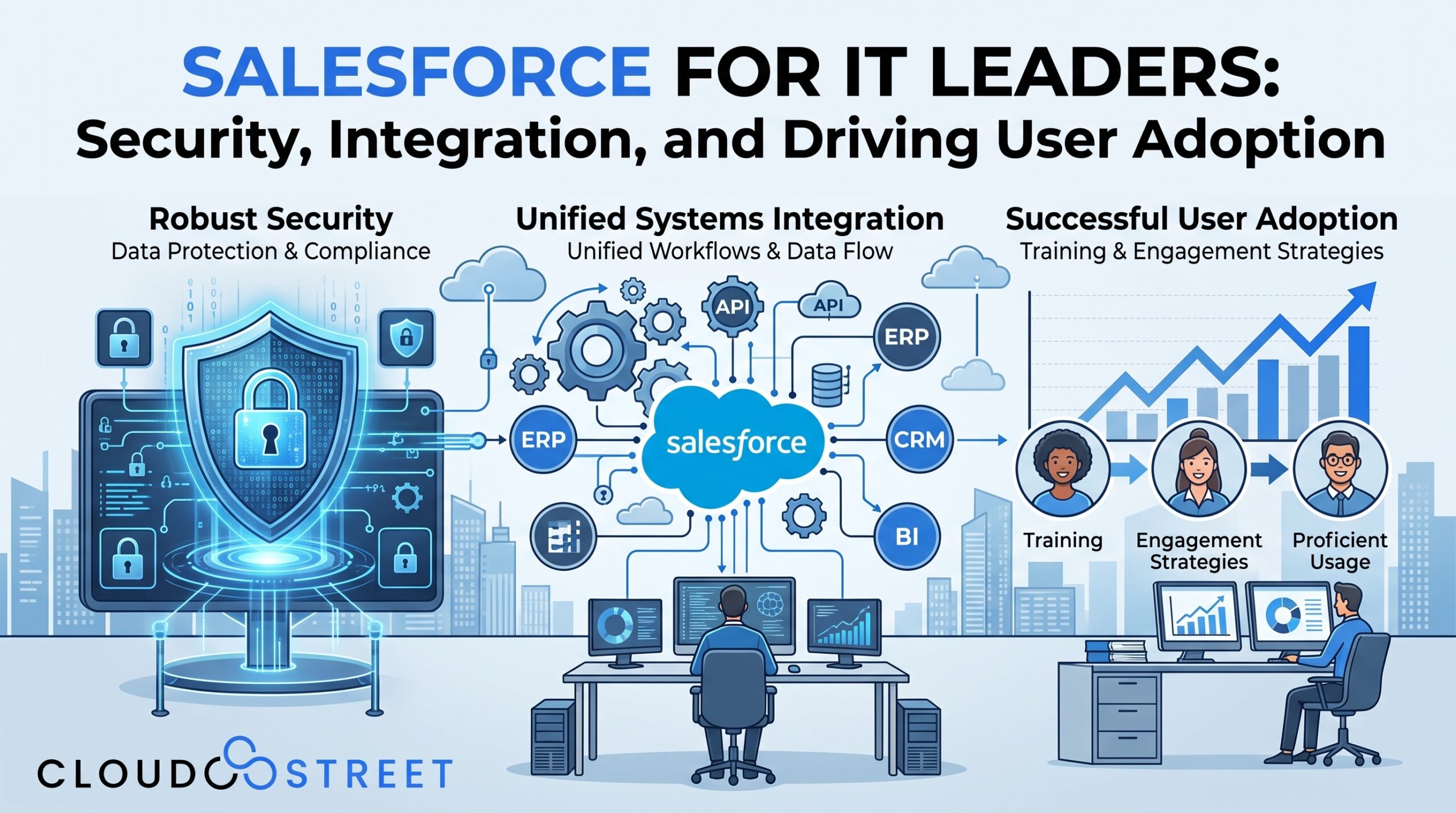
Salesforce can become a strategic platform for sales, service, commerce, and operations. It can also become an inherited IT problem when the organization grows faster than its architecture, governance, and operating model.
For CIOs, IT directors, enterprise architects, and operations leaders at small and mid-sized businesses, the challenge is rarely whether Salesforce is capable enough. The more practical questions are:
- Who owns the architecture?
- Which systems should own which data?
- Can users access only what they need?
- How are changes tested and released?
- What happens when users do not adopt the processes the business designed?
At CloudStreet, we help organizations address these questions through Salesforce consulting and services. We are based in Houston, Texas, and support customers locally and globally.
Why IT Leaders Inherit Salesforce Problems
Salesforce problems often develop gradually. A business adds fields for a new process, installs an application, connects an ERP, gives additional access to a department, and creates workarounds for a reporting requirement. Each decision may seem reasonable in isolation. Over time, however, the org can become difficult to secure, understand, and change.
Common causes include:
- Unmanaged growth: Objects, fields, flows, automations, and integrations accumulate without a consistent architecture.
- Duplicate data: Accounts, contacts, products, and transactions are created in multiple systems without reliable matching or ownership rules.
- Unclear ownership: No individual or team is accountable for data quality, integration health, permissions, or release decisions.
- Point-to-point integrations: Systems connect directly to one another, creating dependencies that are difficult to monitor and change.
- Inconsistent security: Permissions are added reactively, often through broad profiles or manual sharing.
- Low user adoption: Employees bypass Salesforce because the system does not reflect how they actually work.
- Limited release discipline: Changes move directly into production without adequate testing, documentation, or rollback planning.
These conditions create business risk without necessarily producing an obvious system failure. Data may be incomplete rather than unavailable. Integrations may fail intermittently. Users may maintain shadow spreadsheets. Security exposure may result from accumulated permissions rather than a single configuration error.
The IT leader’s role is to make the operating model visible and establish a practical path forward.

Salesforce Security Architecture: Design Access Deliberately
Salesforce security consulting should begin with an understanding of the organization’s data, users, applications, and regulatory responsibilities. The objective is not to make every process restrictive. It is to make access intentional, explainable, and auditable.
1. Establish identity and authentication controls
Use your broader identity strategy as the foundation for Salesforce access. Depending on your environment, this may include:
- Multi-factor authentication
- Single sign-on through an identity provider
- Centralized user lifecycle management
- Defined policies for inactive, temporary, and external users
- Appropriate session, login, and network controls
Authentication confirms who a user is. Authorization determines what that user can do. These should be designed together, but they serve different purposes.
2. Apply least privilege through permission architecture
A sustainable permission model generally combines:
- Roles for hierarchy and record visibility
- Profiles for baseline access
- Permission sets and permission set groups for additional capabilities
- Field-level security for sensitive attributes
- Sharing rules and manual or programmatic sharing where appropriate
Avoid treating profiles as the answer to every access requirement. A large collection of cloned profiles can make it difficult to understand why a user has access. Permission sets can provide a more transparent way to grant specific capabilities.
3. Define record-level visibility
Object and field permissions do not determine whether a user can see a particular record. That depends on the organization-wide defaults, role hierarchy, sharing rules, teams, territories, and other mechanisms.
Start by documenting:
- Which records are confidential?
- Which records should be visible across business units?
- Which exceptions require controlled sharing?
- Which access decisions should be automated?
- How will access be reviewed when someone changes roles?
The appropriate model depends on the business. A private default may be suitable for some objects, while broader access may support collaboration for others.
4. Build auditability and data governance
Security architecture is incomplete if the organization cannot explain what changed, who changed it, or why a user has access.
Create governance standards for:
- Data classification
- Field ownership
- Retention and archival
- Duplicate management
- Administrative access
- Connected applications
- Integration users
- Permission reviews
- Audit logs and monitoring
Salesforce provides detailed security capabilities, but configuration decisions still belong to the customer. Salesforce’s security implementation guidance and secure architecture guidance are useful reference points for this work.
5. Separate environments and responsibilities
Development, testing, user acceptance, and production activities should not be mixed casually. Even a smaller IT team benefits from a defined environment strategy and from separating development access from production administration where feasible.
Salesforce Integration Consulting: Architecture Before Connections
Integration decisions affect security, data quality, user experience, reporting, and operational continuity. Salesforce integration consulting should therefore address business ownership and failure handling, not only technical connectivity.

1. Decide the system of record
For each important data domain, identify the authoritative source. For example:
- Salesforce may own leads, opportunities, and customer engagement.
- An ERP may own inventory, invoices, fulfillment, or financial transactions.
- A commerce platform may manage buyer interactions and storefront activity.
- A legacy application may remain authoritative for specialized operational data.
Not every record needs to be mastered in Salesforce. The important consideration is that ownership is explicit and the downstream systems know which data to trust.
2. Choose integration patterns intentionally
A practical integration strategy may use several patterns:
- Synchronous APIs for immediate validation or transactions.
- Scheduled batch processing for large-volume updates that do not require real-time results.
- Event-based integration where systems need to respond to business events asynchronously.
- Middleware orchestration for transformation, routing, authentication, monitoring, and multi-system workflows.
- Virtual access where data can be viewed from another system without creating unnecessary copies.
The correct pattern depends on latency, transaction volume, data ownership, error tolerance, and operational requirements.
3. Design for failure
An integration is not complete when data moves successfully in a test scenario. IT leaders should also ask:
- How are errors recorded?
- Are retries safe and idempotent?
- Who receives an alert?
- Can operations replay a failed message?
- How are partial transactions reconciled?
- What happens when an external system is unavailable?
- How are schema and API changes managed?
Monitoring should cover both technical health and business outcomes. A connection can be available while orders, invoices, or inventory updates are still failing.
CloudStreet works with complex ERP and legacy integrations, including Salesforce and Oracle Fusion integration services. Our work includes connecting front-office and back-office processes, mapping custom data structures, supporting order and inventory flows, and designing workflows that can be monitored and reconciled.
We also support Salesforce environments involving Sales Cloud, B2B Commerce, and specialized distribution processes. For example, our work with Seattle Aviation Solutions involves aviation parts sales and Salesforce B2B Commerce considerations such as large catalogs, pricing, inventory, ordering, and custom integrations.
Salesforce User Adoption Is an Operating Issue
Training is useful, but training alone does not create Salesforce user adoption. If the system is slow, confusing, disconnected from key processes, or filled with unnecessary fields, additional training may only explain a poor experience.
Adoption improves when the organization addresses five connected areas:
- Usability: Simplify pages, navigation, required fields, and repetitive tasks.
- Role-based processes: Configure Salesforce around the work of sales representatives, managers, service teams, operations staff, and executives.
- Executive sponsorship: Leaders should use the system and reinforce the decisions that depend on trusted Salesforce data.
- Governance: Users need a reliable way to request changes, report defects, and suggest improvements.
- Feedback loops: Review user feedback and adoption metrics after releases, not only during implementation.
Measure behavior that relates to business outcomes. Depending on the process, this could include login frequency, record completion, opportunity stage progression, activity capture, case resolution data, report usage, or the percentage of transactions completed in Salesforce rather than outside it.
Adoption metrics should be interpreted carefully. A login does not prove meaningful use, and a required field does not necessarily create data quality. The goal is to make the correct process the most practical process.

Release and Change Management for Salesforce
Salesforce is a continuously evolving platform. Internal configuration, managed packages, integrations, security policies, and Salesforce releases can all affect the operating environment.
A practical release process includes:
- A sandbox strategy: Define where development, system integration testing, and user acceptance testing occur.
- Documented requirements: Record the business reason, impacted users, dependencies, and acceptance criteria.
- Testing controls: Test security, automation, integrations, reports, data quality, and critical user journeys.
- Deployment controls: Use a defined deployment path and limit direct production changes.
- Release documentation: Maintain change notes, configuration references, and user communications.
- Rollback planning: Identify how the organization will restore service or correct data if a release has an unexpected effect.
- Technical debt inventory: Track obsolete fields, inactive automation, duplicated logic, undocumented integrations, and unsupported workarounds.
- Named ownership: Assign responsibility for decisions, testing, approvals, and post-release monitoring.
Governance does not need to be bureaucratic. A small Salesforce governance group that includes IT, security, a Salesforce administrator or architect, and business representatives can provide useful decision clarity.
A 7-Point Salesforce Assessment Checklist for IT Leaders
Use these questions to assess the current state of your Salesforce environment:
- Can we identify the owner of every critical integration?
- Do we know which system is authoritative for each major data domain?
- Are permissions based on defined job responsibilities rather than historical exceptions?
- Can we explain who can access sensitive objects, records, and fields?
- Do integrations have monitoring, retry handling, alerting, and reconciliation procedures?
- Are releases tested through an agreed sandbox and user acceptance process?
- Do adoption metrics show whether users are completing the processes Salesforce was designed to support?
If several answers are unclear, begin with an architecture and governance assessment rather than adding another isolated feature.
When to Use Internal Resources: and When to Engage a Partner
Internal administrators and IT teams often understand the organization’s users, processes, and priorities better than an outside team. They should remain involved in requirements, ownership, testing, and governance decisions.
Internal resources may be appropriate when:
- The change is small and well understood.
- The existing architecture is documented.
- The team has sufficient Salesforce and integration expertise.
- Security and release controls are already established.
A Salesforce consulting partner can provide useful support when:
- The org has accumulated technical debt.
- A major integration or migration is planned.
- Security access is difficult to explain or review.
- Multiple clouds or business units are involved.
- The internal team lacks capacity for architecture and delivery.
- Adoption issues require process redesign rather than training alone.
- The organization is evaluating Agentforce or other AI capabilities.
CloudStreet supports secure Salesforce architecture, complex ERP and legacy integrations, Sales Cloud, B2B Commerce, aviation parts distribution, and Agentforce/AI readiness. Our Salesforce AI services include consideration of trusted data, permissions, grounding, sensitive information, and the workflows AI is expected to support. We use a hybrid onshore and nearshore delivery model, with US-based strategic oversight and nearshore delivery resources where appropriate.
If you want to discuss your current environment, Schedule a Call with our team. You can also Get a Quote for a defined Salesforce architecture, integration, or managed support engagement, or Contact Our Team with specific questions.
A More Governable Salesforce Environment
For IT leaders, Salesforce architecture is not only a platform configuration exercise. It is an operating model that connects security, data ownership, integration design, user experience, governance, and change management.
A well-governed environment does not eliminate every risk or prevent every exception. It gives leadership a clearer way to evaluate tradeoffs, assign ownership, protect data, and improve the platform over time.
Need a Local Salesforce Consultant in Houston?
Some companies prefer to work with a consulting partner they can meet with in person, especially when architecture decisions, stakeholder alignment, or change management discussions benefit from face-to-face collaboration. If your business is in the Houston area, CloudStreet is based in Houston, Texas, and can provide local Salesforce consulting alongside broader delivery support for regional, national, and global initiatives.
If that is part of your evaluation process, this guide on how to choose a Salesforce consulting partner in Houston, TX offers practical considerations. We support customers locally and globally, including organizations that want a local point of contact in Houston and the surrounding area.
For a broader explanation of how consulting supports growing organizations, read our detailed guide to Salesforce consulting for small and mid-sized businesses. When you are ready to evaluate your environment, explore CloudStreet Salesforce Services or Contact Our Team to begin a practical conversation.
Category: Blog
Category
Discover insights that drive results - explore out latest blog posts now
DealHub Salesforce Integration for Manufacturers: Connecting CPQ, Contracts, and CRM
About the manufacturer: mid-market industrial equipment company A U.S.-based, mid-market [...]
Salesforce Data 360 and Agentforce: Why Grounding Is What Makes AI Agents Dependable
An AI agent can produce a fluent answer and still [...]
Salesforce Data 360 Governance and Informatica: Managing Data Quality, Access, and Trust in the Agentic Era
Data governance becomes more consequential when business data does more [...]