
How to Integrate Salesforce With Your Manufacturing Systems in 5 Steps (Without Breaking the Bank)
Manufacturing companies across the globe are facing a perfect storm: labor shortages, supply chain disruptions, and pressure to modernize operations without breaking budgets. At CLOUDSTREET, we’ve helped manufacturers from our Houston headquarters to clients worldwide navigate these challenges by strategically integrating Salesforce with their existing manufacturing systems.
The reality? Most manufacturing integration projects fail not because of technology limitations, but because companies underestimate the organizational complexity involved. After working with dozens of SMB manufacturers, we’ve identified five critical steps that separate successful integrations from expensive mistakes.
The Real Cost of Integration Mistakes
Before diving into our proven approach, let’s address the elephant in the room. A recent study found that only 25% of manufacturing companies successfully scale their digital integrations beyond pilot phases. The rest get stuck in what industry experts call “pilot paralysis” – repeatedly testing new technologies without ever achieving meaningful business transformation.
The financial impact is staggering. Failed integration projects often cost 3-5 times their original budget when you factor in system downtime, data cleanup, and employee retraining. But here’s the good news: with the right approach, you can achieve robust Salesforce-manufacturing integration for a fraction of what most companies spend on failed attempts.

Step 1: Build Your Integration Foundation (Without the Executive Runaround)
The biggest mistake manufacturing companies make is treating Salesforce integration as purely a technical project. Successful integrations require organizational alignment from day one, but you don’t need expensive C-suite reorganization to achieve it.
Start with stakeholder mapping across 4 key areas:
- Operations teams who understand current manufacturing workflows
- Sales and customer service representatives who interact with customers daily
- IT personnel who maintain existing systems
- Finance teams who track costs and approve budgets
Create a simple integration charter that defines success metrics, budget constraints, and timeline expectations. Focus on specific, measurable outcomes like “reduce quote turnaround time by 50%” or “eliminate manual data entry for 80% of orders.”
Budget reality check: Reserve 20-30% of your total project budget for organizational change management, including training and process documentation. Companies that skimp on this phase typically spend 2-3 times more fixing problems later.
The key insight? Automation isn’t about replacing people – it’s about empowering them to focus on higher-value work. Frame your integration project as workforce enhancement rather than workforce replacement.
Step 2: Map Your Data Integration Priorities (Start Small, Think Big)
Most manufacturing companies try to integrate everything at once. This approach invariably leads to scope creep, budget overruns, and frustrated stakeholders. Instead, identify your highest-impact integration points using our proven priority matrix.
High-impact, low-complexity integrations (start here):
- Customer order status updates from ERP to Salesforce
- Inventory availability for sales quote accuracy
- Basic shipping and delivery confirmations
- Invoice status and payment tracking
Medium-impact integrations (phase 2):
- Production scheduling and capacity planning
- Quality control data and defect tracking
- Supplier performance metrics
- Advanced pricing and discount management
High-impact, high-complexity integrations (phase 3):
- Real-time production monitoring and alerts
- Predictive maintenance scheduling
- Advanced analytics and forecasting
- Multi-location inventory optimization
This phased approach allows you to demonstrate ROI quickly while building internal expertise and confidence. Most of our clients see positive returns within 3-6 months of implementing phase 1 integrations.
Pro tip: Document every data field that needs to flow between systems, but don’t try to sync everything initially. Focus on the 20% of data that drives 80% of your business value.
Step 3: Choose Your Integration Architecture (Without Over-Engineering)
The technology landscape for manufacturing integrations can be overwhelming. Between APIs, middleware platforms, custom connectors, and pre-built solutions, it’s easy to get paralyzed by options. Here’s how to cut through the complexity.
For companies with simple integration needs (1-3 systems):
Direct API connections between Salesforce and your ERP system often provide the best cost-to-benefit ratio. Modern manufacturing systems like SAP, Oracle NetSuite, and Microsoft Dynamics offer robust REST APIs that integrate well with Salesforce.
For companies with complex integration needs (4+ systems):
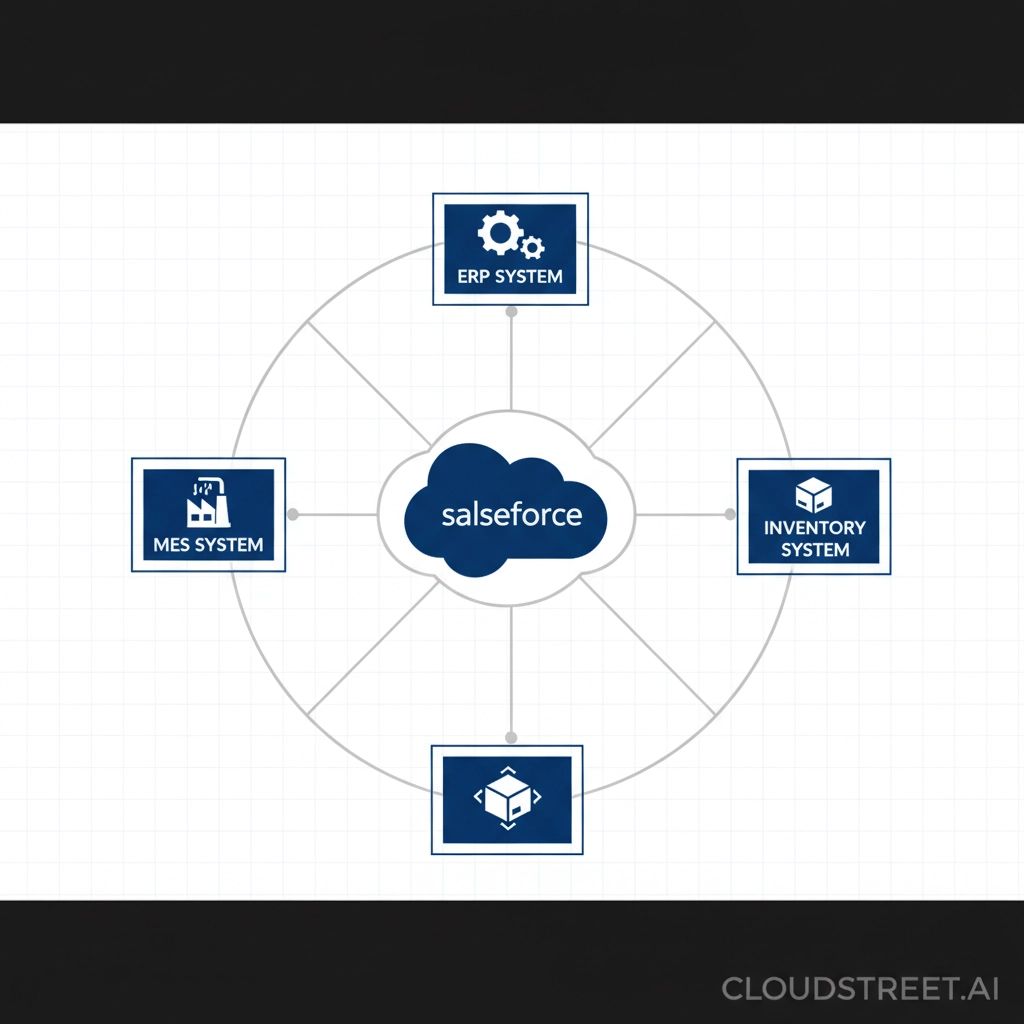
Consider a hub-and-spoke integration platform like MuleSoft, Dell Boomi, or Zapier. While these platforms require higher upfront investment, they dramatically reduce long-term maintenance costs and make future integrations much easier.
Integration pattern guidelines:
- Use real-time sync for critical customer-facing data (orders, inventory, delivery status)
- Use scheduled batch sync for reporting data (daily sales totals, monthly production metrics)
- Use event-driven sync for workflow triggers (order approvals, quality alerts)
Budget allocation recommendation: Spend 40% on integration development, 30% on testing and validation, 20% on change management, and 10% on contingency planning.
At CLOUDSTREET, we’ve helped manufacturers implement cost-effective Salesforce integrations that scale with business growth while maintaining budget discipline.
Step 4: Prepare Your Data and Processes (The Unsexy but Critical Work)
Data quality makes or breaks manufacturing integrations. Unlike other industries where data inconsistencies are merely annoying, manufacturing data errors can halt production lines and impact customer deliveries.
Data cleanup priorities (tackle in this order):
- Customer records: Eliminate duplicates and standardize naming conventions
- Product catalogs: Ensure consistent SKUs, descriptions, and specifications across systems
- Pricing information: Validate current pricing rules and discount structures
- Inventory data: Reconcile stock levels and location information
- Order history: Clean up incomplete or inaccurate order records
Process standardization checklist:
- Define clear workflows for order processing, from quote to delivery
- Establish data governance roles and responsibilities
- Create error handling procedures for system failures
- Document backup processes for critical business functions

Common data mapping challenges and solutions:
Manufacturing systems often use different units of measure, date formats, and naming conventions than Salesforce. Create a comprehensive data dictionary that maps every field between systems, including transformation rules for converting units, currencies, and formats.
Testing strategy: Use production data copies in your testing environment to identify real-world integration issues before going live. Synthetic test data rarely captures the complexity and edge cases present in actual manufacturing data.
Step 5: Execute Your Phased Rollout (Minimize Risk, Maximize Learning)
The final step separates successful integrations from expensive failures. Rather than attempting a “big bang” launch, implement a carefully orchestrated rollout that allows for learning and adjustment.
Phase 1: Proof of concept (2-4 weeks)
Test your integration with a small subset of data and a limited user group. Focus on core functionality and basic error handling. Success criteria: Data flows correctly between systems with minimal manual intervention.
Phase 2: Pilot implementation (4-8 weeks)
Expand to a broader user group and include more complex scenarios. Add comprehensive monitoring and alerting. Success criteria: Users can complete daily tasks without significant disruption.
Phase 3: Full production rollout (8-12 weeks)
Deploy to all users and locations with full monitoring, support processes, and optimization based on pilot learnings. Success criteria: Measurable business impact and user adoption above 80%.

Change management essentials:
- Training programs: Develop role-specific training for different user types
- Support resources: Create easy-to-access help documentation and escalation procedures
- Feedback loops: Establish regular check-ins with users to identify improvement opportunities
- Success communication: Share wins and metrics with stakeholders to maintain momentum
Monitoring and optimization: Set up dashboards that track both technical metrics (API response times, error rates) and business metrics (order processing speed, data accuracy, user satisfaction). Use this data to continuously refine your integration.
Your Next Steps
Integrating Salesforce with manufacturing systems doesn’t have to be a budget-busting, organization-disrupting nightmare. By following these five steps and maintaining focus on business outcomes rather than technical complexity, you can achieve meaningful automation that actually improves your operations.
From our Houston base, CLOUDSTREET has helped manufacturing companies across the United States and internationally implement successful Salesforce integrations that deliver measurable ROI within months, not years. Whether you’re dealing with legacy ERP systems, complex supply chains, or tight budgets, the right integration strategy can transform your manufacturing operations without breaking the bank.
Ready to take the next step? Contact CLOUDSTREET today to discuss how we can help you implement a cost-effective Salesforce integration that grows with your business and delivers immediate value to your team.
The key to successful manufacturing automation isn’t just better technology – it’s better strategy. Start with these five steps, and you’ll be well on your way to joining the 25% of manufacturers who successfully scale their digital transformation efforts.
Category
Discover insights that drive results - explore out latest blog posts now
Case Study: How Highland Cabinetry Colorado Built a Modern Wholesale Powerhouse on Salesforce B2B Commerce Cloud
In the world of high-end cabinetry, timing is everything. When [...]
Agentforce ROI: 7 Ways to Maximize Your Salesforce AI Investment
You've heard the buzz. Salesforce Agentforce is supposed to revolutionize [...]
Salesforce B2B Commerce Cloud Partner & Consultant Guide
You're about to drop serious money on a Salesforce B2B [...]
