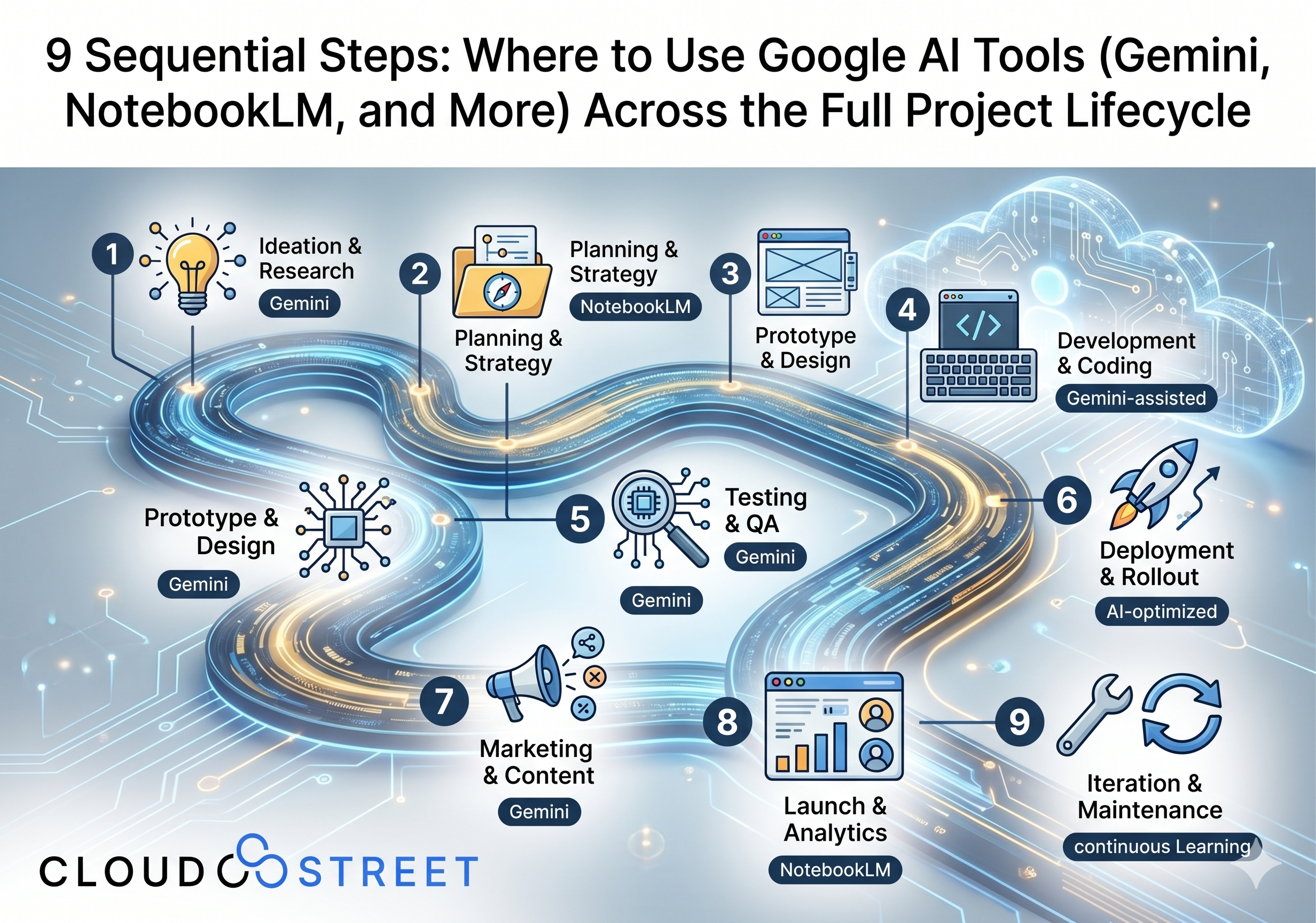
9 Sequential Steps: Where to Use Google AI Tools (Gemini, NotebookLM, and More) Across the Full Project Lifecycle
At CLOUDSTREET, we specialize in implementing measurable ROI into our customers’ technology ecosystems. While we are headquartered in Houston, Texas, we serve a diverse range of medium and large-scale businesses both locally and globally. As enterprises look to integrate Artificial Intelligence (AI) into their internal workflows, Google’s suite of AI tools: specifically Gemini and NotebookLM: has emerged as a powerful duo for streamlining every stage of a project.
The secret to a successful implementation isn’t just having the tools; it’s knowing exactly where to apply them to maximize efficiency and minimize hallucinations. This guide maps out the nine critical phases of a project and identifies the optimal Google AI tools for each.
What’s the Best Tool to Standardize on with a Google Subscription?
Regardless of your Google subscription path, whether you access Gemini through Google Workspace Business or Enterprise, Google One AI Premium, or Google Cloud via Vertex AI, the most practical operating model is still a “Dual-Tool” strategy.
- Gemini (The Doer): This is your generalist powerhouse. Gemini is best for ideation, drafting code, synthesizing meeting notes, and generating creative artifacts. It is the tool you use when you need to create something from a prompt.
- NotebookLM (The Knower): This is your grounded knowledge base. NotebookLM is unparalleled when you need answers tied strictly to your own documents, citations, and a massive reduction in hallucinations. It is the tool you use when you need to consult your project’s specific “source of truth.”
Features like Gemini for Workspace may offer deeper native integration inside tools such as Docs, Sheets, Gmail, and Meet, but the core strategy remains the same across paid Google AI tiers: use Gemini as the “Doer” for creation and execution, and use NotebookLM as the “Knower” for source-grounded understanding.
The prompting strategy matters just as much as the tool choice. In practice, NotebookLM works best as a single, persistent source of truth: usually one notebook per project. That notebook should hold the RFP, meeting transcripts, requirements, design notes, SOPs, testing materials, and other approved reference documents. When the team needs grounded answers, requirement checks, or citation-backed summaries, they should return to that same notebook instead of scattering project knowledge across multiple disconnected spaces.
Gemini works differently. It is usually most effective when used as a single, ongoing Project Thread that carries the working history of the engagement from phase to phase. If you keep one main conversation active, Gemini can retain the context of earlier work like ROI assumptions, requirement summaries, design decisions, object models, and testing plans as you move into build, QA, deployment, and documentation. That saves time because the team does not have to re-explain the project every time they start a new task.
A practical model is simple: keep one NotebookLM notebook per project for source-grounded truth, and keep one main Gemini thread per project for active execution. If a task becomes especially technical or too large for the main conversation, start a separate Deep-Dive Thread for that specific topic, such as an integration mapping issue, Apex refactor, or UAT generation task. Then bring the outcome back into the main Project Thread so the broader project context stays connected.
To make this even more effective, add your project’s NotebookLM notebook directly into your Gemini Project Thread as a source. In Gemini, click the “+” icon in the prompt box and select your NotebookLM notebook. That creates a live link between the “Doer” (Gemini) and the “Knower” (NotebookLM), allowing Gemini to stay connected to the grounded project source while it generates code, UAT scripts, summaries, deployment content, or documentation.
This is what makes the Dual-Tool strategy feel seamless in practice. Your execution engine stays in sync with your knowledge base throughout the project, so Gemini can create with better continuity while still pulling from the same approved source of truth the team is using in NotebookLM.
It is also worth clarifying the difference between the two chat experiences. The native NotebookLM chat is best for Strict Inquiry. It stays tightly within your uploaded sources, which makes it ideal for citation-backed questions, requirement validation, contradiction checks, and other tasks where you want to minimize hallucinations. The Gemini chat, even when a NotebookLM source is attached, is best for Creative Execution. It uses your grounded project data together with Gemini’s broader reasoning, coding ability, drafting power, and web access to create things that do not exist yet, such as code, UAT scripts, rollout plans, or documentation drafts.
By standardizing on Gemini for generative tasks and NotebookLM for authoritative research, your team can move faster without losing accuracy, no matter which paid Google AI subscription level your organization uses.
1. Identify Value Area
Before a single line of code is written, you must determine where the project will actually drive ROI.
- Best Tool: Gemini
- Why: Gemini excels at market research, competitive analysis, and brainstorming potential use cases.
- Best Practices: Use highly specific ROI-focused prompts instead of broad brainstorming, and keep this work in the main Gemini Project Thread so the business case carries forward into later phases. For example, prompt Gemini with: “Act as a Salesforce business analyst for a mid-market manufacturer. Based on these notes, identify the top three process bottlenecks, estimate potential time savings, and draft a simple ROI model using reduced manual effort, faster quote turnaround, and improved order accuracy.” You can also ask: “Compare the current-state process against a proposed Salesforce solution and show where revenue lift, cost reduction, or service efficiency could occur first.” This helps your team quickly narrow the value area before discovery gets too expensive and gives Gemini persistent context for the rest of the project.
- Artifacts: Value proposition drafts, problem statements, opportunity matrices, and high-level ROI projections.
2. Elicit and Define Requirements
Successful projects depend on clear communication. Avoiding common implementation challenges starts with rigorous requirement gathering.
- Best Tool: NotebookLM
- Why: Upload interview transcripts, stakeholder emails, and legacy documentation. NotebookLM will find the contradictions and core needs across hundreds of pages.
- Best Practices: Use NotebookLM to compare sources instead of just summarizing them, and treat it as the single project notebook that holds your approved source material. For example, upload the RFP, discovery call transcripts, workshop notes, and process documents, then ask: “List all gaps between the RFP and the stakeholder interview transcripts, with citations.” You can also ask: “Identify requirements that were requested by sales leadership but never mentioned in the written scope,” or “Create a categorized list of functional, reporting, integration, and user-role requirements from these sources.” Once NotebookLM helps you confirm the requirements, attach that NotebookLM notebook into the main Gemini Project Thread using the “+” source option so later design, build, and testing prompts can reuse the same grounded context. This is especially useful when customers say one thing in meetings and another thing in procurement documents.
- Artifacts: Requirement Traceability Matrix (RTM), summarized stakeholder priorities, gap analysis notes, and draft user stories.

Ready to optimize your tech stack? Contact our Houston-based team to discuss how we can bring ROI-focused AI solutions to your global operations.
3. Design
Mapping out the architecture requires both creativity and adherence to constraints.
- Best Tool: Gemini (for drafting) + NotebookLM (for compliance)
- Why: Use Gemini to draft architecture diagrams or technical specs. Use NotebookLM to ensure those designs don’t violate any previously defined requirements or constraints.
- Best Practices: This phase works best when Gemini is given structured design tasks inside the same ongoing Project Thread used earlier, so it can reference the value areas and requirement decisions already discussed. For example: “Draft a Salesforce object model for a B2B service process including Account, Contact, Opportunity, Quote, Case, Work Order, and custom objects needed for implementation intake.” Or: “Create a text-based ERD for a distributor portal that needs customer-specific pricing, order history, and service cases.” You can also ask Gemini to draft a first-pass Salesforce object schema with field suggestions, lookup relationships, and record ownership assumptions. If you have already attached the NotebookLM notebook as a source in Gemini, the design conversation stays tied to the approved project materials while you work. Then ask NotebookLM in the project notebook: “Check whether this proposed schema supports all approved requirements from the uploaded discovery documents.” That combination helps teams move from rough ideas to a design that actually maps to the agreed scope without losing continuity between phases.
- Artifacts: Solution Design Documents (SDD), wireframe descriptions, ERD drafts, and Salesforce object schema outlines.
4. Build
The construction phase is where efficiency is won or lost.
- Best Tool: Gemini (specifically Gemini Code Assist)
- Why: Gemini can generate boilerplate code, refactor existing scripts, and suggest optimizations within the IDE.
- Best Practices: Use “Small-Batch” prompting. Don’t ask for a whole application; ask for specific functions or components to ensure better quality control. Keep these prompts in the same Gemini Project Thread so the model remembers the requirement and design decisions behind what it is building. It is even better if your NotebookLM notebook is already attached as a source in that thread, because Gemini can then generate against the live project knowledge base while you work. For example: “Write an Apex trigger handler that updates Account fields when a related Opportunity is marked Closed Won,” or “Refactor this Lightning Web Component JavaScript for readability and add inline comments for the next developer.” Gemini is also useful for repetitive build tasks like writing validation rule formulas, test data factories, API payload mappings, and unit test scaffolding. If the coding task becomes too detailed, create a separate Deep-Dive Thread for that technical issue, then bring the resulting output back into the main thread. For Enterprise-level subscribers, Vertex AI can also offer deeper customization and orchestration options during the Build phase.
- Artifacts: Clean, documented code, config logic drafts, integration mapping examples, and unit test scripts.

5. Test and Debug
Debugging is often the most time-consuming part of the lifecycle.
- Best Tool: Gemini
- Why: Paste error logs into Gemini to identify root causes and potential fixes instantly, and use it to generate structured UAT scripts based on requirements.
- Best Practices: Provide context. Instead of just pasting an error, paste the relevant code block and the error together for a more accurate diagnosis. This is another place where the main Gemini Project Thread matters, because testing quality improves when Gemini already remembers the project requirements, design assumptions, and build decisions. If you have added the NotebookLM notebook into Gemini with the “+” source option, Gemini can also pull directly from that grounded project context while generating test assets. Just as important, use Gemini to create UAT Scripts before formal testing starts. A strong prompt looks like: “Using these approved requirements, generate UAT scripts for Sales reps and Customer Service users. For each script, include test scenario name, user role, preconditions, step-by-step actions, expected result, actual result, pass/fail field, and defect notes.” You can get even more specific with prompts such as: “Create 15 UAT test cases for an Opportunity-to-Quote process in Salesforce, including positive, negative, and exception scenarios,” or “Generate a UAT script for creating a new customer account, converting a lead, generating a quote, and validating approval routing.” For debugging, ask: “Review this failing Apex test, explain the root cause, and suggest the smallest code fix.” For QA preparation, ask: “Convert these user stories into UAT scripts with business-language steps that non-technical users can follow.” If a defect analysis gets too technical, use a Deep-Dive Thread for that issue, but anchor the final answer back to the main project conversation. This is one of the fastest ways to turn requirements into test-ready assets without making the QA or dev team start from scratch.
- Artifacts: Bug fix reports, automated test case updates, detailed UAT scripts, regression scenarios, and test execution sheets.
6. Train
A system is only as good as the people using it. Our managed services often emphasize the importance of user adoption.
- Best Tool: NotebookLM
- Why: NotebookLM can turn your technical documentation into an “Audio Overview”: a podcast-style summary that helps users understand the “why” and “how” of the new system.
- Best Practices: Create a “Training Notebook” for users, or add training materials to the main project notebook if you want one persistent NotebookLM source of truth for the entire engagement. Users can ask questions like, “How do I process a refund in the new portal?” and get answers cited directly from the manual. You can also upload role-based materials and ask NotebookLM: “Create a sales rep quick-start guide from these admin notes,” or “Summarize the top 10 things a customer service manager needs to know for day one.” Another practical use is turning dry SOPs into cleaner enablement assets, such as: “Convert this setup document into a user-friendly training checklist with simple business language.”
- Artifacts: User FAQs, training podcasts, role-based quick-start guides, and onboarding checklists.

7. Deploy
The “Go-Live” phase requires precision and clear checklists.
- Best Tool: Gemini
- Why: Gemini is excellent at generating deployment runbooks and communication templates for stakeholders.
- Best Practices: Ask Gemini to “Create a 10-step rollback plan in case the database migration fails during deployment.” You can also prompt it with: “Draft a go-live checklist for a Salesforce deployment including final regression review, profile validation, integration monitoring, user communication, and hypercare ownership,” or “Write a stakeholder announcement email for go-live day and a separate message for issue escalation if deployment is delayed.” Keep this work in the main Gemini Project Thread so deployment communications reflect the same scope, assumptions, and stakeholder language established earlier in the project. This is especially useful for converting technical cutover plans into clear instructions that project managers, admins, and business users can all follow.
- Artifacts: Deployment checklists, email announcements, rollback procedures, and hypercare communication drafts.
8. Document
Documentation is often skipped because it takes time, teams are trying to hit deadlines, and customers often do not want to pay extra for it. That is a mistake, because when documentation is missing, every future enhancement, support ticket, and admin handoff gets slower and more expensive.
- Best Tool: Gemini
- Why: It can turn working notes, code comments, requirements, and meeting transcripts into polished deliverables without forcing the dev team to spend hours writing from scratch.
- Best Practices: This is where Google AI tools can make documentation fast, affordable, and practical enough to actually get done. The best approach is to generate drafts inside the same main Gemini Project Thread, because Gemini can then use the full history of prior phases instead of forcing the team to restate the project background. When the NotebookLM notebook is attached as a source in that thread, Gemini can stay aligned to the approved project record while drafting manuals or historical summaries. For example, prompt Gemini with: “Turn these sprint notes, config screenshots, and solution details into an admin manual with sections for business purpose, object changes, automation, reports, and maintenance tips.” Or: “Create a project history document from these meeting transcripts, decisions, and change requests, organized by date, issue, decision, and impact.” You can also use prompts like: “Write a step-by-step user manual for inside sales reps creating quotes in Salesforce,” or “Convert these technical deployment notes into a customer-friendly support handoff guide.” Instead of treating documentation as a separate expensive workstream, the team can generate a strong first draft quickly, review it, and deliver high-quality manuals and project history without dragging out the budget.
- Artifacts: System manuals, admin guides, user guides, project history logs, and internal knowledge base articles.
9. Enhance
Post-launch, the focus shifts to continuous improvement and analyzing case studies for further optimization.
- Best Tool: NotebookLM
- Why: Upload user feedback, ticket logs, and performance metrics. Ask NotebookLM, “What are the top three recurring complaints users have about the new interface?”
- Best Practices: Update your project notebook regularly. As the system evolves, keep the “source of truth” fresh so the AI remains accurate. You can ask more targeted questions like: “Compare post-launch support tickets against original requirements and identify unmet expectations,” or “Summarize which enhancement requests appear most often by user role.” Another useful prompt is: “Based on these support logs and adoption reports, recommend the next five improvements with the highest business impact and lowest implementation effort.” Then carry those recommendations into the main Gemini Project Thread to draft the next-phase backlog, business case, or solution approach without starting from zero. Enterprise-level subscribers can go further with Vertex AI for deeper customization in the Enhance phase.
- Artifacts: Feature roadmap recommendations, performance optimization reports, enhancement backlogs, and adoption insight summaries.

Maximizing Your AI Investment
Integrating Google AI tools across these nine phases allows your team to maintain a high velocity without sacrificing the grounded accuracy that enterprise projects require. Whether you are looking to build a new Salesforce portal or optimize your existing cloud infrastructure, CLOUDSTREET is here to ensure your technology delivers real-world results.
Based in the heart of Texas, we bring global expertise to every local project. Explore our full range of services to see how we can help you implement AI with confidence.
Category
Discover insights that drive results - explore out latest blog posts now

DealHub Salesforce Integration for Manufacturers: Connecting CPQ, Contracts, and CRM
About the manufacturer: mid-market industrial equipment company A U.S.-based, mid-market [...]
Salesforce Data 360 and Agentforce: Why Grounding Is What Makes AI Agents Dependable
An AI agent can produce a fluent answer and still [...]
Salesforce Data 360 Governance and Informatica: Managing Data Quality, Access, and Trust in the Agentic Era
Data governance becomes more consequential when business data does more [...]