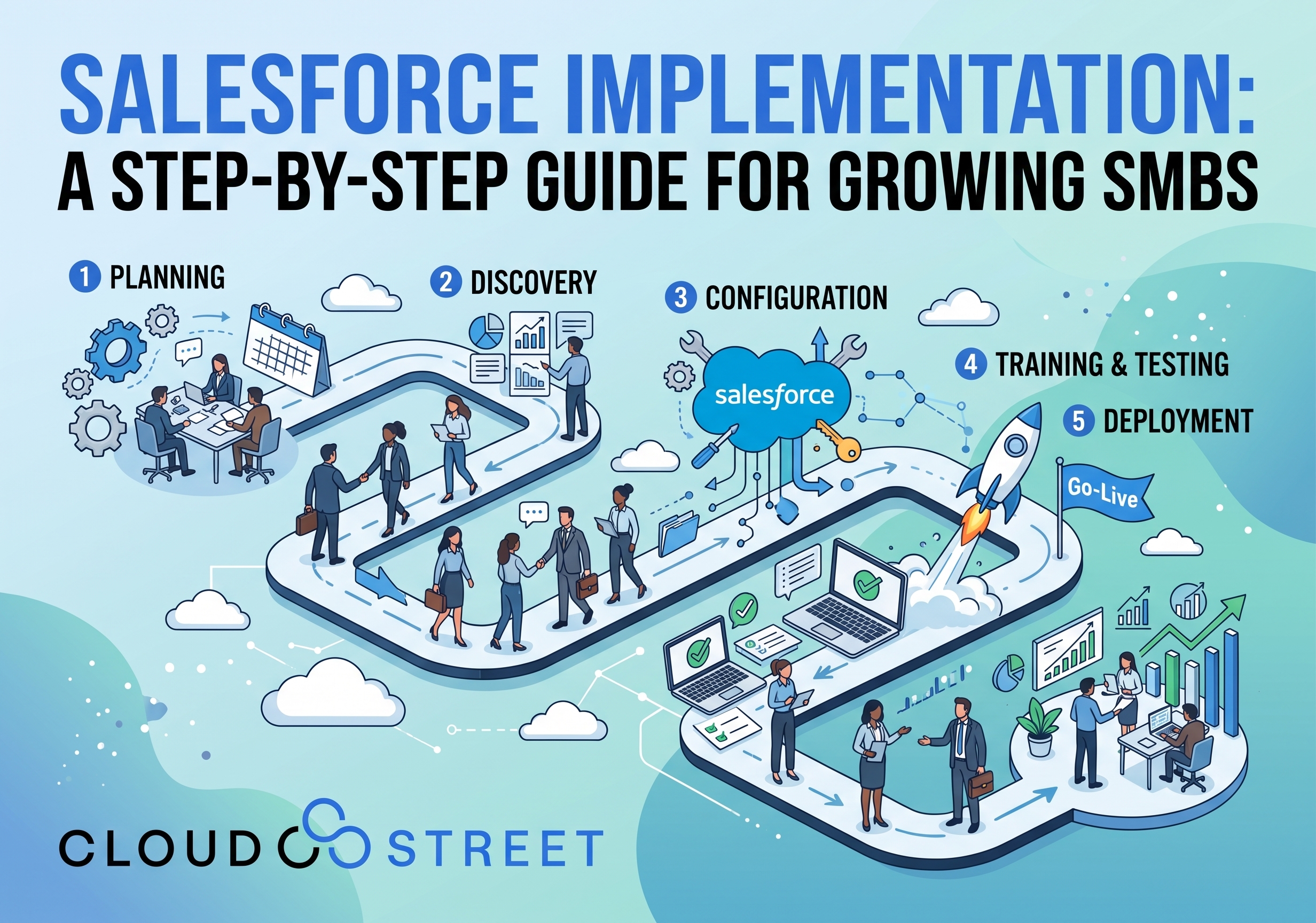
Salesforce Implementation: A Step-by-Step Guide for Growing SMBs
Category: Blog
Salesforce can give a growing business a stronger foundation for sales, service, marketing, and commerce. However, the platform can also become difficult to manage when it is configured without a clear methodology. Users may return to spreadsheets, teams may create workarounds, and the business may pay for capabilities that do not support its priorities.
A structured Salesforce implementation helps connect the technology to the way your business actually operates. At CloudStreet, we help growing businesses plan, configure, integrate, migrate, and improve Salesforce environments with practical business goals in mind.
This guide explains our 10-step Salesforce implementation methodology, what affects a Salesforce implementation timeline, and how to reduce the risk of creating a fragmented “Franken-system.”
For a broader overview, read our detailed guide to Salesforce consulting for small and mid-sized businesses.
The 10 Steps in a Salesforce Implementation Methodology
1. Define business discovery goals
The implementation should begin with the business, not with a list of Salesforce features.
We start by learning how your organization generates revenue, serves customers, manages accounts, handles approvals, and measures performance. Discovery conversations may include sales, operations, marketing, finance, service, and IT stakeholders.
Typical discovery questions include:
- Which processes are slowing growth or creating unnecessary manual work?
- Where are teams relying on spreadsheets, email, or disconnected applications?
- What information should leaders see in reports and dashboards?
- Which customer or operational experiences need to become more consistent?
- What business outcomes would indicate that the implementation is progressing appropriately?
This process helps separate essential requirements from preferences and creates a shared understanding among stakeholders.
If you are evaluating your current environment, Schedule a Call with CloudStreet to discuss your goals.
2. Assess the current Salesforce org and business processes
For an existing Salesforce customer, we review the current org before recommending changes. This assessment can include objects, fields, automation, permissions, reports, integrations, data quality, and user behavior.
We also examine the processes around Salesforce. A technically functional org may still create friction if:
- Sales stages do not reflect the actual buying process
- Required fields are difficult for users to complete
- Approval steps happen outside the system
- Reports depend on inconsistent data entry
- Integrations create duplicate or incomplete records
- Different teams maintain separate versions of customer information
For a new Salesforce customer, the equivalent assessment focuses on legacy CRM tools, spreadsheets, finance systems, marketing platforms, service applications, and other sources of business data.
3. Establish scope, roadmap, and success metrics
Once the current state is understood, we define the initial scope and create a roadmap. The goal is to establish a manageable first release while preserving a path for future improvements.
Success metrics should be relevant to your business. Examples may include:
- Greater visibility into pipeline stages
- More consistent lead routing
- Fewer manual data entry steps
- Improved completeness of account or opportunity records
- Faster access to operational or customer information
- Better adoption of agreed Salesforce processes
These are measurement examples, not guaranteed outcomes. The right metrics depend on your starting point, user behavior, process design, and ability to maintain the system after launch.
A phased roadmap can help an SMB address the highest-value processes first rather than attempting to change every department at the same time.

4. Create a data strategy and prepare for migration
Salesforce data migration is more than importing files into new objects. It involves deciding what data belongs in Salesforce, how it should be structured, and how it will be maintained.
Our data preparation process typically includes:
- Identifying source systems and data owners
- Reviewing duplicate, incomplete, outdated, or conflicting records
- Deciding which historical data should be migrated
- Mapping source fields to Salesforce fields
- Defining transformation and normalization rules
- Performing test loads in a sandbox
- Validating relationships, ownership, picklists, and reports
- Planning the production cutover and post-migration checks
Data quality can have a direct effect on the Salesforce implementation timeline. A smaller volume of well-structured data may require less effort than a larger set of inconsistent spreadsheets and legacy records.

5. Design solution architecture and security
The architecture phase translates business requirements into a Salesforce design. We consider the data model, object relationships, automation, reporting, environments, integrations, and security model together.
Security design may include:
- Profiles and permission sets
- Role hierarchy and sharing rules
- Field-level access
- Record ownership
- Approval authority
- Data visibility between departments, regions, or business units
- Access for external partners or customers
For growing businesses, a design that works today should also be understandable as the organization adds users, teams, products, and processes.
6. Choose configuration and custom development appropriately
We generally recommend using standard Salesforce capabilities where they support the business requirement. Standard functionality is often easier to maintain, explain, test, and adapt over time.
Custom development can be appropriate when the requirement is important, differentiated, and not reasonably supported through configuration. Examples may include Apex, Lightning Web Components, specialized user interfaces, or custom business logic.
To avoid a fragmented “Franken-system,” we recommend four practices:
- Start with documented business processes rather than requested features
- Use standard Salesforce capabilities when they are a reasonable fit
- Document exceptions and explain why they require customization
- Govern custom code through architecture review, testing, documentation, and release controls
Our Salesforce Services include implementation, configuration, migration, integration, development, and ongoing support.
7. Plan integrations with surrounding systems
Salesforce rarely operates alone. A growing business may need connections with ERP, marketing automation, service, finance, e-commerce, payment, tax, shipping, or identity systems.
Integration planning should clarify:
- Which system owns each type of data
- Whether data moves one way or in both directions
- How frequently synchronization occurs
- What happens when a record fails to process
- How duplicates are prevented
- How integration activity is monitored and supported
CloudStreet has experience with complex Salesforce integrations and business processes that connect front-office and back-office teams. Our work includes B2B Commerce, aviation parts distribution, and quote-to-cash workflows.
For businesses serving distributors, wholesalers, or commercial buyers, our B2B Commerce Accelerator services can support storefront configuration, ERP connectivity, payment processing, catalog management, and customer-specific pricing considerations.
8. Test the system in multiple ways
Testing should take place throughout the implementation, not only immediately before launch. A practical test plan includes at least five forms of validation:
- Unit testing: Confirm individual flows, components, rules, and custom code work as designed.
- System testing: Validate complete processes within Salesforce.
- Integration testing: Confirm that data moves correctly between Salesforce and connected systems.
- User acceptance testing: Ask representative business users to complete realistic scenarios.
- Data validation and regression testing: Confirm migrated data is accurate and that new changes have not disrupted existing functionality.
Test scripts should include normal scenarios, exceptions, permission differences, failed integrations, approval paths, and edge cases. User acceptance testing is especially valuable because business users often identify practical issues that are not visible in a technical review.
9. Prepare users through training and change management
Training should reflect the work users perform, not simply demonstrate every available Salesforce feature.
We develop role-based enablement for groups such as sales representatives, managers, service agents, operations teams, and administrators. Useful training materials may include:
- Guided scenarios
- Short process demonstrations
- Quick-reference instructions
- Frequently asked questions
- Ownership and escalation guidance
- Administrator documentation
Change management also involves communication. Users should understand why processes are changing, what is expected of them, and where to request help.
Internal champions or super users can provide practical support during the transition and help project teams identify areas that need refinement.
10. Deploy, provide hypercare, and optimize
Deployment planning brings together data cutover, integration activation, permissions, training, communications, and support.
Depending on the project, a business may use a pilot, phased rollout, or single production deployment. The appropriate approach depends on risk, user groups, integration dependencies, and operational constraints.
After launch, hypercare provides focused support while users work in the new environment. This period may include:
- Monitoring integrations and critical automations
- Reviewing user questions and support requests
- Correcting configuration issues
- Validating migrated records and reports
- Tracking adoption indicators
- Prioritizing enhancements for the next release
Salesforce optimization continues after go-live. A lightweight governance process can help your team evaluate enhancement requests, manage technical debt, review new Salesforce capabilities, and keep future changes aligned with business priorities.

Example Salesforce Implementation Timeline
The following table provides planning ranges for a growing SMB. These are examples, not guarantees. Some activities can overlap, while integrations, data preparation, and stakeholder availability may extend the schedule.
| Phase | Example range | Typical focus |
|---|---|---|
| Discovery and assessment | 1–3 weeks | Goals, process review, org assessment, stakeholder alignment |
| Scope, architecture, and roadmap | 1–3 weeks | Requirements, success measures, data model, security, release plan |
| Configuration and development | 3–8 weeks | Standard Salesforce configuration, automation, custom development |
| Data migration preparation | 2–6 weeks | Cleansing, mapping, test loads, validation, cutover planning |
| Integration development and testing | 2–8 weeks | ERP, marketing, service, finance, commerce, payment, or other connections |
| UAT and regression testing | 2–4 weeks | Business scenarios, defect resolution, data validation |
| Training and deployment | 1–2 weeks | Role-based training, final cutover, user readiness |
| Hypercare and optimization | 2–4 weeks initially | Support, monitoring, adoption review, prioritized improvements |
A relatively focused Salesforce implementation may take several weeks. A broader program involving multiple clouds, complex data migration, several integrations, custom development, and numerous approval paths may take several months.
What Affects the Salesforce Implementation Timeline?
Seven factors commonly influence duration:
- Number of users: More users can mean more roles, permissions, training needs, and feedback.
- Data quality: Duplicate, incomplete, or poorly structured records require additional preparation.
- Number of Salesforce clouds: Sales, Service, Marketing, Commerce, and other products may add design and testing requirements.
- Integration scope: Each connected system introduces data ownership, monitoring, and error-handling considerations.
- Customization level: Custom objects, automation, Apex, and Lightning Web Components require additional build and test work.
- Approval complexity: Multi-step approvals and regional or departmental variations can extend design and UAT.
- Stakeholder availability: Timely decisions, testing, and sign-off depend on access to knowledgeable client stakeholders.
When selecting a Salesforce implementation partner for small business, ask how the partner will handle these variables, document assumptions, and manage changes to scope.
Start Your Salesforce Implementation with a Practical Plan
A successful Salesforce implementation is not defined only by the production deployment date. It also depends on whether the system reflects your business processes, provides reliable information, supports secure collaboration, and remains manageable as your company grows.
CloudStreet is based in Houston, Texas, and serves customers locally and globally. We work with growing businesses on Salesforce implementation, data migration, custom development, complex integrations, B2B Commerce, aviation parts distribution, and quote-to-cash initiatives.
Need a Local Salesforce Consultant in Houston?
If your company is in the Houston area and your team prefers working with a local consultant in person, CloudStreet is based in Houston and can provide face-to-face Salesforce consulting alongside broader delivery support. For organizations weighing local access, industry experience, and delivery approach, our guide on how to choose a Salesforce consulting partner in Houston, TX offers a practical framework for evaluation.
If you are planning a new implementation or evaluating an existing org:
- Schedule a Call to discuss your objectives.
- Get a Quote for Salesforce implementation or related services.
- Contact Our Team with questions about scope, timeline, integrations, or migration.
Category
Discover insights that drive results - explore out latest blog posts now
DealHub Salesforce Integration for Manufacturers: Connecting CPQ, Contracts, and CRM
About the manufacturer: mid-market industrial equipment company A U.S.-based, mid-market [...]
Salesforce Data 360 and Agentforce: Why Grounding Is What Makes AI Agents Dependable
An AI agent can produce a fluent answer and still [...]
Salesforce Data 360 Governance and Informatica: Managing Data Quality, Access, and Trust in the Agentic Era
Data governance becomes more consequential when business data does more [...]