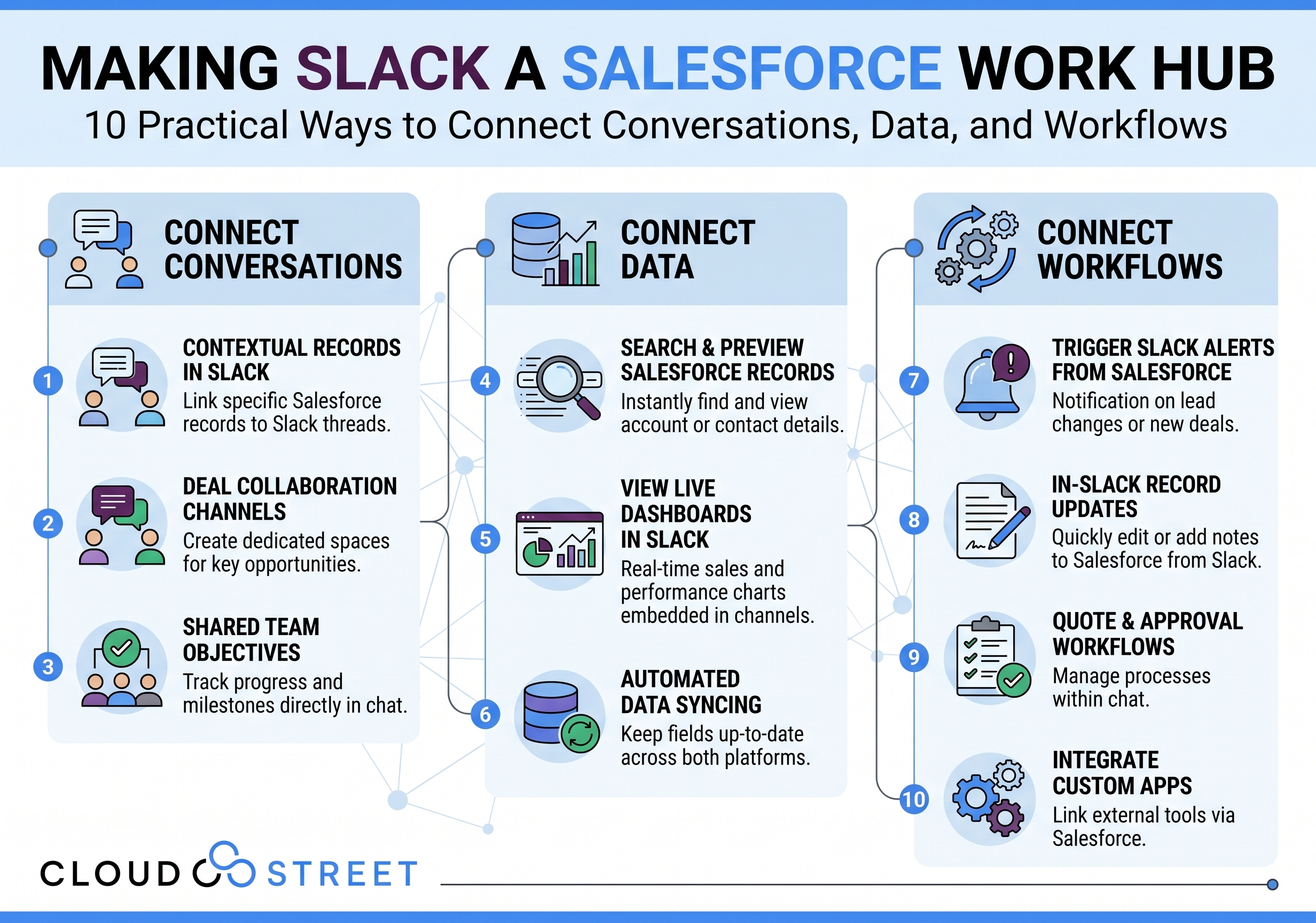
Making Slack a Salesforce Work Hub: 10 Practical Ways to Connect Conversations, Data, and Workflows
Label: Agentforce Commerce
Category: Blog
Introduction: Slack is more than messaging when connected to Salesforce
Slack is often where teams discuss customers, deals, service issues, and operational priorities. Salesforce is where the organization manages structured customer and business data. When these platforms are designed to work together, Slack can become a practical work hub for Salesforce users: not another disconnected data silo.
A successful Salesforce Slack integration brings relevant information and approved actions into the conversations where work already happens. It also preserves the role of Salesforce as the authoritative system for customer and business records.
At CloudStreet, we help organizations design, configure, implement, secure, test, and support integrations between Salesforce and workplace tools such as Slack. Based in Houston, Texas, we serve customers locally and globally. Our focus is not simply connecting applications; it is helping companies implement Salesforce capabilities that produce measurable operational value.
If your teams are duplicating updates between Slack and Salesforce, Schedule a Call to discuss the current process and possible improvements.
The business case for a Salesforce-Slack work hub
The value of connecting Salesforce to Slack comes from reducing unnecessary context switching while improving the quality and timeliness of collaboration. Sales teams can discuss an opportunity alongside current CRM information. Service teams can coordinate escalations with case context available in the same channel. Operations teams can receive structured notifications when a record requires attention.
A well-designed work hub can help organizations:
- Make approved Salesforce information easier to find.
- Reduce manual status updates and duplicate data entry.
- Route notifications to the right people and channels.
- Support faster decisions without bypassing Salesforce controls.
- Create a clearer connection between conversations, actions, and outcomes.
The design matters. Before implementation, leadership should decide which system is authoritative for accounts, contacts, opportunities, cases, orders, and customer data. Slack can provide context and collaboration, but it should not become the unofficial system of record.
Get a Quote for Salesforce integration consulting, architecture, and implementation support.
10 practical Salesforce-Slack capabilities
1. Connected Slack channels for Salesforce records
Teams can organize channels around accounts, opportunities, cases, projects, or internal initiatives. Approved Salesforce records and updates can then appear in the channels where the related work takes place.
For example, an opportunity channel might receive a structured update when the stage, close date, amount, or owner changes. A service channel might receive an alert when a high-priority case is escalated.
The objective is not to copy every Salesforce change into Slack. We recommend defining notification rules based on business significance, audience, and urgency. This helps reduce alert overload while ensuring that important updates reach the right team.

2. Slackbot and conversational assistance
Slackbot and connected conversational tools can help users answer questions, summarize information, draft content, and initiate approved actions. With a Slack CRM integration, a user might ask for a summary of an account, request a draft follow-up message, or identify open cases connected to a customer.
These capabilities should respect Salesforce and Slack permissions. A user should not receive information through Slack that they could not access in Salesforce. User mapping, permission sets, sharing rules, integration users, and data exposure policies all require careful review.
We help clients define which questions and actions are appropriate for conversational assistance and which activities should continue to require direct Salesforce interaction or human approval.
3. Huddles, clips, and meeting follow-up
Huddles and clips can make collaboration more immediate, but decisions made in live conversations can become difficult to locate later. A useful Salesforce work hub includes a repeatable follow-up process.
After a huddle or clip, teams can capture:
- Decisions made.
- Customer commitments.
- Action items and owners.
- Relevant account, opportunity, or case references.
- Deadlines and follow-up dates.
The final record may be stored in Salesforce, a canvas, a list, or an approved knowledge location, depending on the process. The important consideration is that material decisions do not remain buried in an unstructured conversation.
4. Canvases and Lists for shared work
Slack Canvases and Lists can provide a working layer around Salesforce data. A canvas might contain an account plan, implementation checklist, renewal preparation notes, or links to key Salesforce records. A list might track action items from a customer meeting, onboarding tasks, or case escalation activities.
We recommend treating these tools as collaboration surfaces rather than replacements for Salesforce. Structured customer facts, commitments, and status fields should remain in Salesforce where they can be governed and reported on.
CloudStreet can help determine when a canvas or list adds value and when a Salesforce object, task, or Flow is the better long-term design.
5. Slack Connect for customer and partner collaboration
Slack Connect can support collaboration with customers, vendors, and partners. It can be useful for strategic accounts, implementation projects, service coordination, and partner operations.
External collaboration requires clear boundaries. Before enabling a shared channel, organizations should define:
- Which Salesforce information can be referenced.
- Which users may participate.
- Whether external members can see automated notifications.
- Which actions require internal approval.
- How the channel will be archived and reviewed.
A customer-facing channel should not automatically expose internal account notes, pricing details, case information, or unrelated records. We design Slack Connect patterns around data classification and least-privilege access.
6. AI summaries and explanations
AI summaries can help users catch up on long threads, explain unfamiliar terms, and identify decisions or next steps. When combined with Salesforce context, summaries can bring together relevant conversation history and CRM information.
This can be especially useful before a customer call, executive review, service escalation, or renewal meeting. However, summaries should be treated as assistance, not unquestioned authority. Teams should know which information came from Salesforce, which came from Slack, and when a human should verify the result.
Our Salesforce AI and Agentforce services include guidance on grounding, sensitive data handling, testing, and responsible adoption.
7. Channel Expert Agents
Channel Expert Agents can provide specialized assistance inside approved Slack channels. A channel expert might answer questions about an internal process, surface relevant information, summarize recent activity, or help a team locate subject matter expertise.
Governance is central to this capability. Agents need a defined purpose, approved knowledge sources, appropriate user access, and clear escalation paths. Organizations should also establish ownership for reviewing agent behavior and updating the information it uses.
An agent that can search broadly but has no clear scope may create confusion. We recommend starting with focused use cases and measuring answer quality, adoption, escalation frequency, and business impact.
8. Agentforce in Slack
Slack Agentforce integration can connect approved Salesforce digital coworkers and actions to workflows such as sales follow-up, service triage, onboarding, and account updates.
For example, an Agentforce agent could help a seller summarize an opportunity, prepare a follow-up draft, or identify missing information. A service agent could help organize case context and route an escalation. An onboarding agent could answer approved internal questions and create a shared checklist.
Agentforce actions should be designed with boundaries. Read-only assistance may be appropriate for a broad audience, while record updates, approvals, and customer communications may require narrower permissions or human confirmation.
Salesforce’s AgentExchange marketplace can provide approved apps and agents, but each option still deserves architecture, security, licensing, and support review before adoption.
9. Search and Salesforce work objects
Users need to find relevant records without searching multiple systems manually. Salesforce in Slack can help teams locate and engage with work objects such as accounts, contacts, opportunities, cases, orders, tasks, and related documents.
Search design should account for:
- Salesforce sharing rules.
- Slack channel permissions.
- Duplicate records and naming conventions.
- Document retention requirements.
- Whether a result is current and authoritative.
The goal is not to make every record visible everywhere. It is to make the right information discoverable to the right users at the right time.
10. Workflow Builder and Salesforce workflow automation
Slack Workflow Builder and Salesforce Flow can automate recurring steps such as approvals, lead routing, case escalation, onboarding, daily standups, and Salesforce record updates.
Examples include:
- Routing a new lead to the correct sales channel.
- Sending a structured approval request for a discount.
- Alerting a service team when a case reaches a defined priority.
- Creating onboarding tasks after a new employee or customer milestone.
- Posting a renewal reminder when an account reaches a defined time horizon.
Reliable automation also requires error handling, ownership, monitoring, retry logic, and a clear process for changing the workflow. An automation that fails silently can create more operational risk than a manual step.
Architecture and governance decisions to make first
Before implementing a Salesforce Slack integration, we recommend documenting these decisions:
- System of record: Define whether Salesforce, an ERP, or another system owns each data domain.
- Identity and access: Map Salesforce and Slack users consistently and apply least-privilege permissions.
- Data boundaries: Separate internal, confidential, regulated, and customer-facing information.
- Notification strategy: Route only meaningful events to avoid alert fatigue.
- Action controls: Identify which actions are read-only, approval-based, or fully automated.
- Monitoring and ownership: Assign responsibility for failures, access reviews, agent changes, and support.
- Measurement: Track adoption, response times, data quality, workflow completion, and business outcomes: not simply the number of connected apps.
CloudStreet can also help connect Salesforce Sales Cloud, Service Cloud, Commerce Cloud, and Experience Cloud workflows to Slack where appropriate. For commerce, Agentforce Commerce solutions apply to B2C, D2C, and B2B Commerce. Experience Cloud and Commerce Cloud can be designed together for customer portals that connect buyer experiences with internal processes. Our B2B Commerce Cloud services provide additional guidance for complex commerce architectures.
Use cases for sales, service, operations, and customers
A work hub can support several business functions:
- Sales: Opportunity channels, deal summaries, approval workflows, follow-up drafting, and pipeline alerts.
- Service: Case escalation channels, incident collaboration, customer history summaries, and resolution checklists.
- Operations: Order updates, cross-functional handoffs, inventory notifications, and exception management.
- Customer collaboration: Slack Connect channels with carefully limited information and clearly defined internal ownership.
For companies connecting Salesforce with ERP or financial systems, our Salesforce and Oracle Fusion integration services can help align customer, order, invoice, and operational data before it is surfaced in Slack.
CloudStreet’s practical implementation approach
We typically structure Salesforce integration consulting around seven stages:
- Assess: Review Salesforce, Slack, business processes, data, permissions, and current pain points.
- Design: Define architecture, objects, channels, notifications, agent boundaries, and ownership.
- Configure and build: Configure native capabilities and develop custom integrations or actions where needed.
- Test: Complete functional, security, integration, user acceptance, and failure-path testing.
- Train: Prepare administrators, managers, end users, and support teams for the new operating model.
- Monitor: Track errors, permissions, usage, workflow performance, and agent responses.
- Optimize: Improve routing, prompts, automation, adoption, and measurable business outcomes over time.
Professional support matters because a connected work hub spans more than two applications. It affects security, data governance, business process design, user behavior, and ongoing administration.
Conclusion: Connect conversations to accountable work
Slack can become a valuable Salesforce work hub when it is designed around authoritative data, clear permissions, meaningful notifications, and accountable workflows. The strongest implementations connect conversations to actions without weakening Salesforce governance.
CloudStreet helps medium-sized and larger organizations connect Salesforce to Slack through architecture, custom development, security design, testing, training, and managed support. We are based in Houston, Texas, and work with customers locally and globally.
If you are evaluating Salesforce in Slack, planning a Slack Agentforce integration, or looking to improve Salesforce workflow automation, Contact Our Team for a practical conversation about your environment.
You can also Schedule a Call or Get a Quote for your Salesforce integration project.
Category
Discover insights that drive results - explore out latest blog posts now
DealHub Salesforce Integration for Manufacturers: Connecting CPQ, Contracts, and CRM
About the manufacturer: mid-market industrial equipment company A U.S.-based, mid-market [...]
Salesforce Data 360 and Agentforce: Why Grounding Is What Makes AI Agents Dependable
An AI agent can produce a fluent answer and still [...]
Salesforce Data 360 Governance and Informatica: Managing Data Quality, Access, and Trust in the Agentic Era
Data governance becomes more consequential when business data does more [...]