Custom Salesforce Development: When Does Your Business Actually Need It?
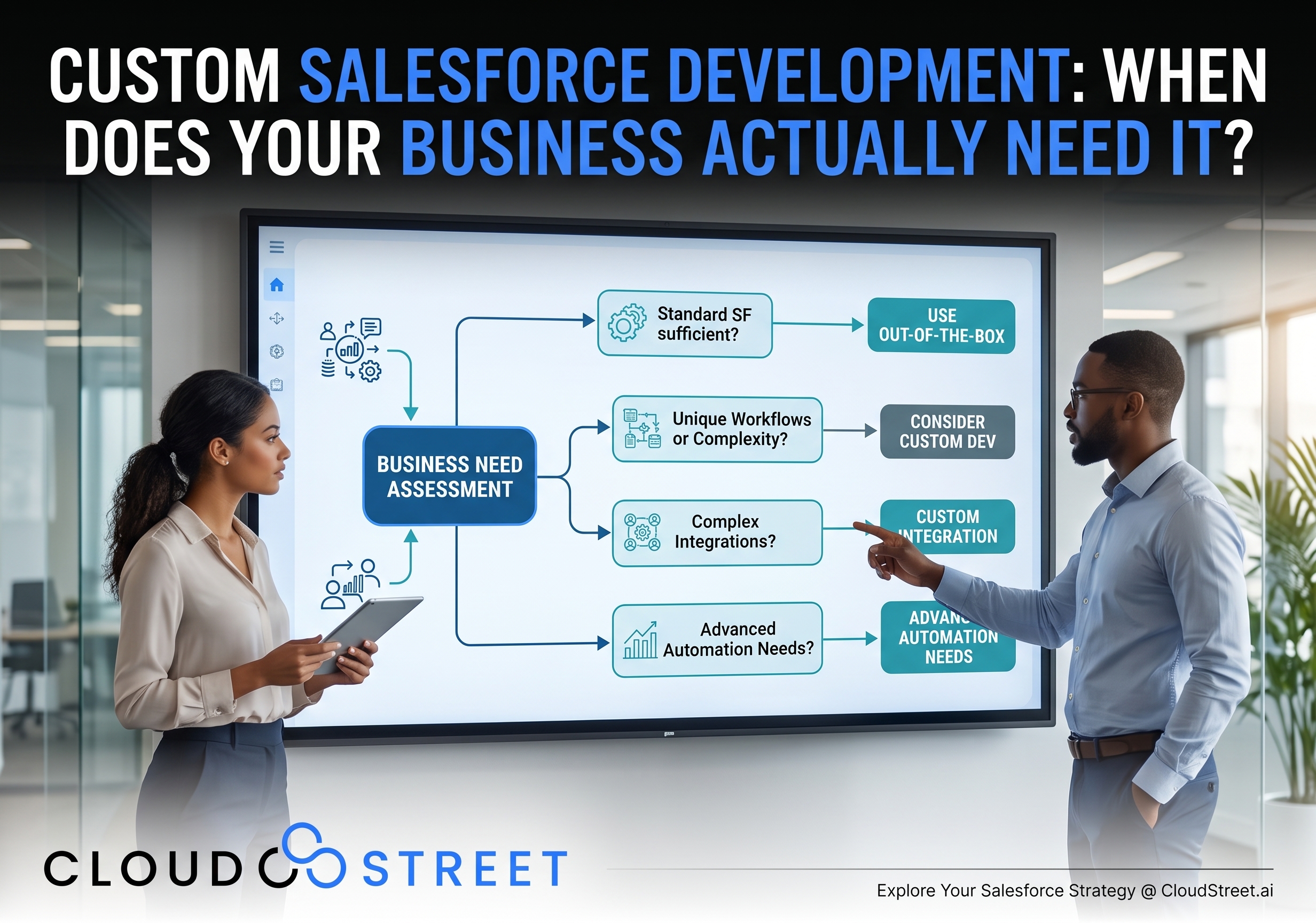
Salesforce gives small and mid-sized businesses a broad set of tools for managing customer relationships, sales processes, service operations, commerce, and reporting. Yet the platform’s flexibility can create an important question: when is Salesforce configuration enough, and when does custom development make business sense?
Our recommendation is straightforward:
Use standard Salesforce capabilities when they meet the requirement. Consider customization when the business case, user need, and long-term operating model justify it.
That principle helps SMBs avoid two costly outcomes: forcing Salesforce to handle a requirement it cannot support cleanly, or paying for custom code when configuration would have delivered a simpler result.
This article explains how to evaluate that decision. For the broader context, see our detailed guide to Salesforce consulting for small and mid-sized businesses.
Start with configuration before custom development
Salesforce configuration uses tools that administrators and business teams can generally manage without writing code. These capabilities are powerful enough to support many common CRM requirements.
8 common out-of-the-box Salesforce capabilities
- Objects: Standard objects such as Accounts, Contacts, Leads, Opportunities, Cases, and Products provide a foundation for common business processes. Custom objects can also represent business information without custom code.
- Fields: Standard and custom fields capture the data users need, including text, dates, numbers, picklists, formulas, and relationships.
- Flow: Flow supports record-triggered automation, guided user experiences, approvals, notifications, and multi-step business processes.
- Validation rules: Validation rules prevent incomplete or inconsistent data from being saved when a straightforward condition can express the requirement.
- Approvals: Approval processes route records through defined review steps, such as discount authorization, contract review, or exception handling.
- Reports: Reports help teams organize and analyze Salesforce data using filters, groupings, summaries, and cross-object reporting.
- Dashboards: Dashboards turn reports into visual summaries for sales, service, marketing, and executive leadership.
- Security: Profiles, permission sets, roles, sharing rules, field-level security, and other controls help determine who can view or change information.
Salesforce also provides standard integration options for many widely used applications. If a reliable connector or supported API already addresses the requirement, it may be more practical than building a custom integration.
Contact our team if you want an independent review of whether your requirement can be handled with configuration.

When to customize Salesforce: 6 practical considerations
Custom Salesforce development becomes more appropriate when configuration cannot meet the functional, technical, or user-experience requirement in a sustainable way.
- Complex business logic
Some businesses have pricing, eligibility, allocation, commission, approval, or fulfillment rules that span multiple objects and conditions. If those rules become difficult to express, test, or troubleshoot in Flow, Apex can provide a clearer service layer.
- Specialized user experiences
Standard page layouts, Dynamic Forms, quick actions, and screen flows support many user needs. A custom interface may be justified when users need highly interactive screens, specialized search, guided product selection, real-time calculations, or an experience that standard components cannot provide.
- External system integrations
Salesforce may need to exchange information with an ERP, warehouse system, payment provider, tax service, aviation parts database, or proprietary application. APIs and middleware can support those connections, while Apex may handle Salesforce-side validation, orchestration, and error management.
- High-volume processing
Large data sets and recurring batch operations require careful architecture. A nightly process that evaluates thousands or millions of records may call for asynchronous Apex, a Bulk API pattern, or middleware rather than a synchronous Flow.
- Unique data models
Standard CRM objects may not adequately represent specialized products, contract structures, inventory relationships, technical attributes, or quote-to-cash processes. Custom objects and relationships may solve part of the problem; Apex or a managed package may be appropriate when the model requires deeper behavior.
- Configuration that is no longer maintainable
Configuration is not automatically simple. A Salesforce org with deeply nested Flows, repeated logic, unclear naming, and undocumented exceptions can become difficult to support. In that situation, refactoring into reusable Apex services or a more deliberate architecture may reduce operational risk.
Apex, LWC, APIs, and middleware in plain language
Custom Salesforce development does not refer to one technology. It can involve several layers, each suited to a different type of requirement.
Apex development
Apex is Salesforce’s server-side programming language. It is useful for complex validation, reusable business services, custom web services, transaction control, and logic that runs when data changes through the user interface, an API, or another process.
Apex development may be appropriate when a requirement involves:
- Complex logic across multiple objects.
- Custom callouts to external services.
- Reusable rules used by Flow, APIs, and user interfaces.
- Scheduled, batch, or event-driven processing.
- Detailed error handling and transaction management.
Apex also operates within Salesforce governor limits. These platform limits regulate resources such as queries, database operations, CPU time, and memory in a multitenant environment. Good design includes bulk-safe processing, selective queries, avoidance of database operations inside loops, and asynchronous processing where appropriate.
Lightning Web Components development
Lightning Web Components are reusable interface components for Salesforce Lightning and supported Salesforce experiences. They can provide a richer, more focused user experience than standard components or a basic screen flow.
For example, an LWC could present:
- A product search interface with multiple filters.
- A quote workspace combining data from related records.
- A custom pricing or inventory display.
- A guided order-entry experience.
- A responsive work queue for service or operations teams.
LWC development generally works alongside Apex. The component manages the user experience, while Apex exposes the necessary server-side data and business services.
APIs and middleware
APIs enable Salesforce to exchange information with other systems. Middleware provides an additional integration layer that can transform data, coordinate processes, manage authentication, route messages, and monitor failures.
A useful pattern is:
- The external system or middleware handles system-to-system exchange.
- Salesforce APIs provide standard data access where possible.
- Apex applies Salesforce-specific business rules when needed.
- Asynchronous processing handles work that does not need to complete during the user’s transaction.
This approach can reduce tight coupling and make it easier to change one system without redesigning the entire process.
Managed packages from AgentExchange
A managed package from AgentExchange may be a sensible option when a mature solution already exists for a common requirement such as payments, document generation, tax, subscription management, or industry functionality.
A package can reduce the amount of custom code your team owns, but it still requires evaluation. Consider the vendor’s support model, upgrade process, data model, security approach, licensing, and ability to fit your business processes.
Explore CloudStreet’s Salesforce services to discuss whether configuration, custom development, an AgentExchange package, or a combination is appropriate.

A configuration-versus-development decision framework
| Requirement | Start with configuration when | Consider custom development when |
|---|---|---|
| Data capture | Standard or custom fields represent the information clearly | The data model requires specialized behavior or complex relationships |
| Automation | Flow can express the process with manageable logic and volume | The process requires advanced transaction control, reusable services, or complex branching |
| User experience | Page layouts, Dynamic Forms, quick actions, or screen flows are sufficient | Users need a specialized, interactive, or highly responsive interface |
| Validation | A validation rule or simple Flow handles the condition | Rules span multiple objects, external data, or complex calculations |
| Integration | A standard connector or straightforward API exchange is available | The integration needs custom callouts, transformation, retries, orchestration, or event processing |
| Data volume | Processing occurs in manageable user-driven or scheduled batches | High-volume operations require Bulk API, Batch Apex, Queueable Apex, or middleware |
| Industry functionality | A suitable Salesforce feature or AgentExchange package exists | The business has distinctive workflows that packaged functionality cannot support cleanly |
| Maintenance | Administrators can understand, test, and update the solution | Configuration has become fragile, repetitive, or difficult to govern |
The right answer is often hybrid. For example, Flow may orchestrate a process while invoking Apex for one complex calculation. An LWC may provide a specialized interface while using standard Salesforce objects and APIs behind the scenes.
The tradeoffs SMB leaders should evaluate
Custom development can create a better user experience or support a distinctive business process. It also creates responsibilities that should be included in the business case.
7 development and operating considerations
- Development cost: Custom code requires architecture, development, testing, deployment, documentation, and future support.
- Testing: Code and complex integrations need repeatable unit, system, regression, and user acceptance testing.
- Technical debt: Short-term workarounds can become expensive when requirements change or original design decisions are no longer understood.
- Release management: Customizations should move through controlled environments with versioning, deployment plans, and rollback considerations.
- Security: Access controls, sharing behavior, API credentials, data exposure, and secure coding practices need review.
- Maintainability: Another administrator or development partner should be able to understand the solution without relying on one individual’s memory.
- Upgrade compatibility: Salesforce releases continuously. Customizations and packages should be reviewed against platform changes and dependencies.
The purpose of this evaluation is not to discourage customization. It is to ensure that custom Salesforce development supports a measurable business or user outcome rather than adding complexity without a clear return.
Build a customization inventory and governance process
A sensible customization inventory gives your organization a current view of what exists in the Salesforce org and why.
6 fields for a useful customization inventory
- Requirement: What business problem does the customization address?
- Owner: Which business or technical leader is accountable for its continued relevance?
- Technology: Is it a Flow, Apex class, trigger, LWC, integration, AgentExchange package, or another component?
- Dependencies: Which objects, fields, packages, systems, and users rely on it?
- Testing and documentation: Where are the test cases, technical notes, support instructions, and deployment records?
- Review date: When should the customization be reassessed for value, security, compatibility, and maintenance cost?
Governance does not need to be bureaucratic. A practical review process can include an architecture check for new work, security review for data access, testing requirements based on risk, and periodic cleanup of unused automation and components.

How CloudStreet approaches custom Salesforce development
At CloudStreet, we design Salesforce solutions around business processes, user needs, system boundaries, and expected return on investment. We are based in Houston, Texas, and work with customers locally and globally.
Our experience includes customizations for:
- B2B Commerce: Specialized storefront experiences, customer-specific pricing, product relationships, checkout processes, and commerce integrations. Learn more about our B2B Commerce Accelerator.
- Aviation parts distribution: Complex catalogs, inventory and pricing lookups, aviation-specific search requirements, quote requests, and connections to operational systems.
- Quote-to-cash: Workflows that connect opportunities, quotes, orders, payments, fulfillment, and downstream sales records.
- Complex integrations: Data exchange between Salesforce and ERP, payment, logistics, accounting, warehouse, and other business systems.
We also help customers assess where newer capabilities, including Salesforce AI and Agentforce, may fit into an existing architecture. The same principle applies: begin with a clear use case, evaluate standard capabilities, and extend the platform when the business need supports it.
Final recommendation: customize with purpose
The question is not whether Salesforce can be customized. It can. The more useful question is whether a customization will improve a meaningful business process enough to justify its cost and ongoing responsibility.
Start with standard objects, fields, Flow, validation rules, approvals, reporting, security, integrations, and available packages. Move to Apex, Lightning Web Components, APIs, middleware, or asynchronous processing when the requirement’s complexity, volume, user experience, or integration needs call for it.
Need a Local Salesforce Consultant in Houston?
If your company is in the Houston area and your team prefers working with a consultant in person, CloudStreet is based in Houston, Texas, and can provide local, face-to-face Salesforce consulting alongside broader delivery support. For leadership teams comparing local and remote consulting models, our article on how to choose a Salesforce consulting partner in Houston, TX offers a practical framework. We also work with customers locally and globally, so organizations can combine local collaboration with broader project delivery when that fits the engagement.
If you are evaluating when to customize Salesforce or want a second opinion on an existing org, you can Schedule a Call, Get a Quote, or Contact Our Team.
Category
Discover insights that drive results - explore out latest blog posts now
DealHub Salesforce Integration for Manufacturers: Connecting CPQ, Contracts, and CRM
About the manufacturer: mid-market industrial equipment company A U.S.-based, mid-market [...]
Salesforce Data 360 and Agentforce: Why Grounding Is What Makes AI Agents Dependable
An AI agent can produce a fluent answer and still [...]
Salesforce Data 360 Governance and Informatica: Managing Data Quality, Access, and Trust in the Agentic Era
Data governance becomes more consequential when business data does more [...]