Channel Your Infographic: How CloudStreet Brings Salesforce into Slack : 4 Ways to Bridge Your Data
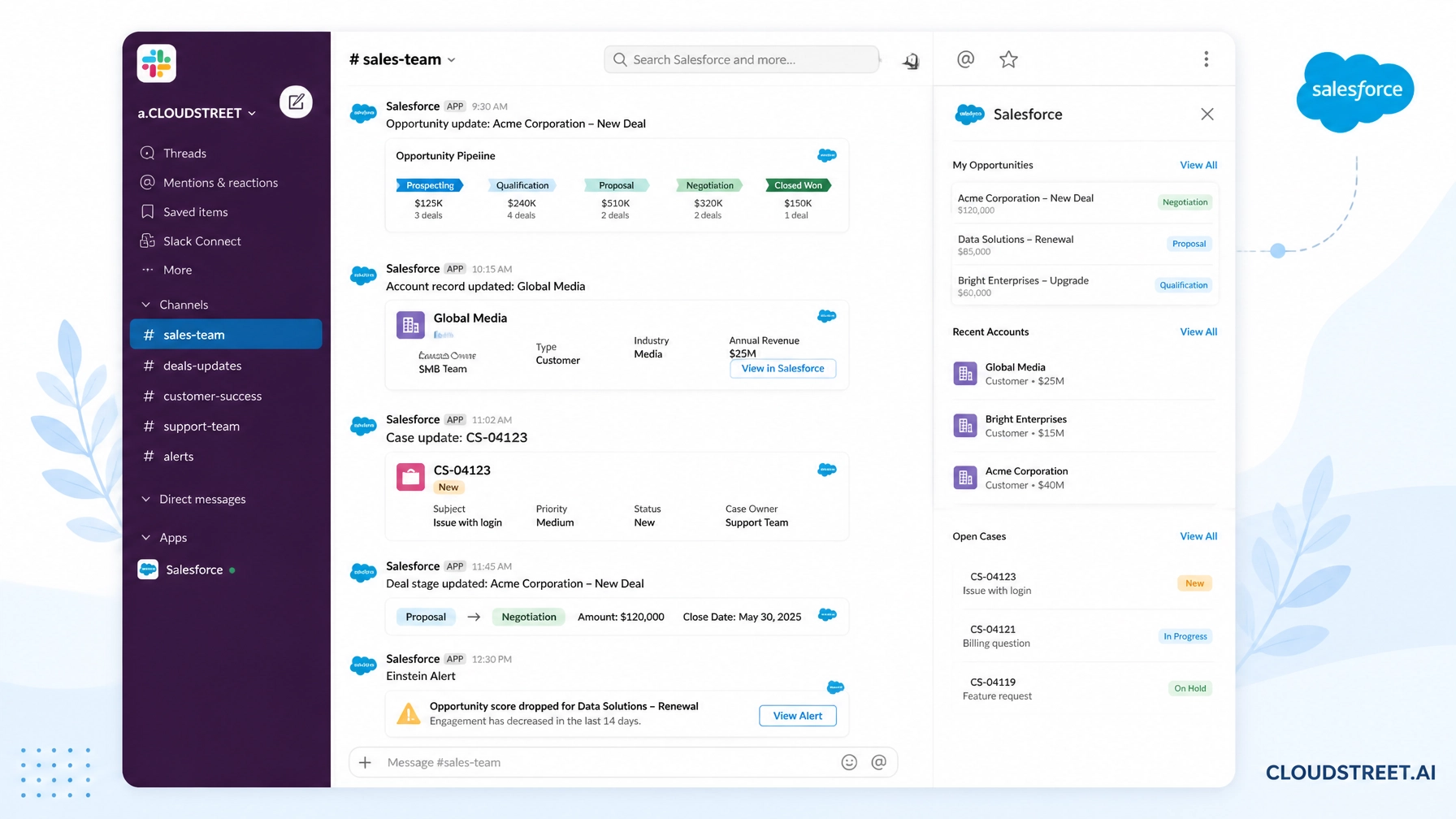
For modern B2B organizations, sales reps, customer success managers, and DevOps engineers, the biggest productivity killer isn’t a lack of tools: it’s the endless switching between them. Your team lives in Slack, collaborating across channels, threads, and huddles. Yet your source of truth: your customer data, deal pipeline, and support cases: lives tightly locked inside Salesforce.
Headquartered in Houston, Texas, CloudStreet partners with businesses both locally and globally to eliminate these operational silos. We specialize in turning complex Salesforce orgs into high-ROI engines. When your communication platform and your CRM operate on entirely different islands, your teams waste valuable hours manually copying notes, searching for account histories, and updating record stages.
Integrating Salesforce into Slack changes the game entirely. But success requires more than just installing a plug-in out of the box; it demands strategic configuration tailored to your internal workflows.
Why Slack’s Channel Architecture Changes CRM Interaction
Unlike meeting-centric collaboration tools, Slack is built around channels, projects, topics, and async streams. Every conversation can be mapped directly to a specific business outcome: whether it’s #acme-corp-deal, #support-escalation-9982, or #product-launch-2026.
When you connect Salesforce to Slack with expert guidance from our team at CloudStreet, you transform chat rooms into live, interactive CRM workspaces. Instead of treating your CRM as a database that only gets updated at the end of the quarter, your team interacts with Salesforce data precisely where conversations happen.
To explore how our tailored implementations can elevate your operations, feel free to Schedule a Call with our team today.
4 Ways CloudStreet Connects Salesforce Directly to Your Slack Channels
Maximizing CRM adoption means meeting your users in their favorite environment. Here are four core strategies we use to integrate Salesforce seamlessly into your Slack workspace:
1. Dedicated Salesforce Channels for Accounts and Opportunities
Instead of forcing reps to open Salesforce to check an account status, we set up bi-directional Salesforce channels. These specialized channels link directly to standard and custom CRM records.
- Live CRM data sits side-by-side with team discussions for that specific account or deal.
- Updates made in Slack reflect instantly in Salesforce, and vice-versa, ensuring complete data hygiene.
- Security permissions are automatically inherited from your Salesforce org, ensuring compliance and strict data governance.
2. Streamlined Workflows and Slash Commands
Manual data entry is the primary enemy of data accuracy. We configure custom Slack workflows and slash commands: such as /sfdc-create-opportunity or /sfdc-lookup-account: so your team can execute CRM actions without leaving chat.
- Trigger Einstein-powered Salesforce Flows directly from Slack messages.
- Route deal approvals, pipeline updates, and case escalations instantly through automated alerts.
- Enable team members to respond to alerts and update fields inline, turning notifications into immediate, actionable tasks.
3. Collaborative Slack Canvases and List Columns
Documentation and metrics shouldn’t live in scattered Google Docs or siloed dashboards. We leverage Slack Canvases and list columns to bring rich CRM context into everyday team spaces.
- Embed live Tableau Next metrics, account dashboards, and key performance indicators directly inside shared channel canvases.
- Sync Salesforce pipeline stages to Slack lists for quick visual tracking across projects.
- Combine team playbooks, onboarding checklists, and CRM record links into a single, interactive command center for every deal.
4. Smart Alerts and Notifications Without the Noise
Alert fatigue is real. If every minor field update triggers a notification, your team will simply mute the channel. We implement intelligent alert filtering so your teams only see high-impact events.
- Configure channel-specific alerts for critical milestones, such as major deal stage changes, high-value lead assignments, or urgent case escalations.
- Allow team members to swarm around escalated support tickets in dedicated temporary channels with automatic CRM record attachments.
- Ensure executives and managers get precise operational visibility without drowning in unnecessary chatter.

Unlocking Advanced Capabilities with Expert Architecture
Implementing a robust Salesforce and Slack integration requires deep technical alignment across your entire technology stack. Whether you are synchronizing your CRM with complex ERP systems or building custom AI-driven automation, a haphazard setup often leads to broken syncs and low user adoption.
At CloudStreet, our consulting engagements are engineered to deliver measurable return on investment. By pairing our Salesforce Services with cutting-edge Salesforce Artificial Intelligence solutions, we ensure that your Slack workspace doesn’t just display data: it actively helps your teams close deals faster and resolve client issues with intelligent recommendations.
Are you ready to see how a customized integration can streamline your sales and service pipelines? Get a Quote from our Houston-based experts to evaluate your current setup.
Empowering B2B Sales, DevOps, and Support Teams
The benefits of bringing Salesforce into Slack extend far beyond the sales department:
- B2B Sales Teams can collaborate on complex deal strategies in private channels while keeping pipeline stages pristine.
- DevOps & Engineering Teams managing Salesforce deployments can track release pipelines, bug reports, and user feedback loops right inside their technical channels.
- Customer Success & Support Teams can swarm around critical cases, pulling ticket histories and customer tiers instantly into the conversation.
By centralizing communication and data, organizations eliminate the friction of context-switching. Your team spends less time updating spreadsheets and more time driving revenue and building lasting client relationships.

Transform Your Daily Workflow Today
Bridging the gap between Salesforce and Slack is one of the fastest ways to boost user adoption, improve data hygiene, and accelerate your business processes. But you don’t have to figure out complex API mapping, permission sets, and workflow triggers on your own.
Whether you operate locally in Texas or manage distributed global teams, CloudStreet brings decades of hands-on expertise to every Salesforce implementation. Let us help you turn your collaboration tools into a high-powered CRM command center.
To discuss your integration strategy with our consultants, Contact Our Team today and take the first step toward a more connected, efficient enterprise.

Category
Discover insights that drive results - explore out latest blog posts now

DealHub Salesforce Integration for Manufacturers: Connecting CPQ, Contracts, and CRM
About the manufacturer: mid-market industrial equipment company A U.S.-based, mid-market [...]
Salesforce Data 360 and Agentforce: Why Grounding Is What Makes AI Agents Dependable
An AI agent can produce a fluent answer and still [...]
Salesforce Data 360 Governance and Informatica: Managing Data Quality, Access, and Trust in the Agentic Era
Data governance becomes more consequential when business data does more [...]