
Box Intelligent Content Management with Salesforce
In today’s fast-paced business environment, the ability to seamlessly manage content while maintaining strong customer relationships is crucial for success. When you combine Box’s intelligent content management platform with Salesforce’s powerful CRM capabilities, you create a unified ecosystem that transforms how teams collaborate, manage documents, and drive revenue.
At CLOUDSTREET, we’ve helped businesses across Houston, Texas, and globally unlock the full potential of this powerful integration. Let’s explore how Box and Salesforce work together to create a content-intelligent CRM experience that drives real business results.
What Makes Box + Salesforce Integration Special?
Box’s intelligent content management platform doesn’t just store your files: it makes them work smarter within your Salesforce environment. This integration brings AI-powered document generation, automated workflows, and secure collaboration directly into your CRM processes.
When your sales team can generate proposals, contracts, and presentations without leaving Salesforce, while maintaining enterprise-grade security and compliance, that’s when productivity really takes off. The integration leverages Box’s advanced AI capabilities, including their new AI Studio and Box Apps features, to create custom workflows that fit your specific business needs.
Ready to streamline your content workflows? Discover how our Salesforce services can help you implement Box integration seamlessly.

5 Game-Changing Benefits of Box-Salesforce Integration
1. Streamlined Document Generation and Management
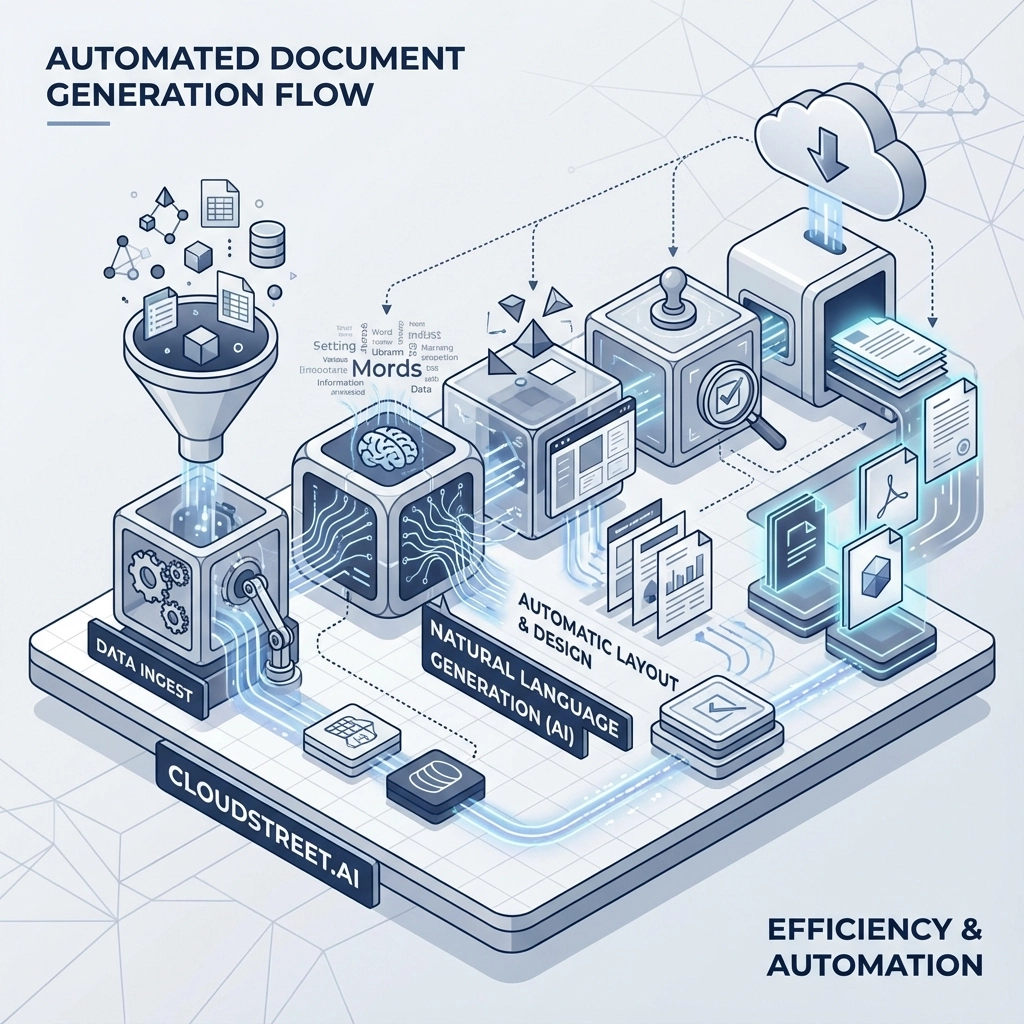
Gone are the days of switching between multiple applications to create and manage sales documents. With Box’s Doc Gen API integrated into Salesforce, your team can automatically generate contracts, proposals, and reports using CRM data. This means consistent formatting, accurate data population, and significantly reduced time-to-quote.
The integration allows you to:
- Auto-populate documents with Salesforce data
- Create templates that maintain brand consistency
- Version control documents directly within Salesforce records
- Track document interactions and engagement
2. Enhanced Security and Compliance
Box’s enterprise-grade security features extend into your Salesforce environment, ensuring that sensitive customer information and business documents are protected at every level. With features like granular access controls, audit trails, and compliance with regulations like GDPR and HIPAA, you can confidently manage content across both platforms.
This is particularly valuable for industries like healthcare, finance, and legal services where data protection isn’t just important: it’s mandatory.
3. Real-Time Collaboration Across Teams
The integration breaks down silos between your sales, marketing, and operations teams. When marketing creates new collateral in Box, it’s immediately available within relevant Salesforce records. When sales teams update customer information, document access permissions automatically adjust based on deal stages or customer status.
4. AI-Powered Content Intelligence
Box’s AI capabilities bring smart content insights directly into your Salesforce workflows. The platform can automatically extract key information from uploaded documents, classify content, and even suggest relevant documents based on deal characteristics or customer profiles.
This intelligence helps sales reps:
- Quickly find relevant case studies or proposals
- Understand document engagement patterns
- Identify content gaps in sales processes
- Automate content recommendations
Want to see how AI can transform your sales content strategy? Our team at CLOUDSTREET specializes in implementing intelligent integrations that drive measurable results. Let’s talk about your specific needs.
5. Improved Customer Experience
When your content management and CRM work together seamlessly, your customers benefit from faster response times, more personalized interactions, and consistent communication across all touchpoints. The integration enables features like:
- Instant access to customer-specific documents during calls
- Automated delivery of relevant resources based on deal stage
- Streamlined e-signature processes within Salesforce
- Real-time document collaboration with customers
How the Integration Works in Practice
The Box-Salesforce integration operates through several key mechanisms that create a unified content and customer management experience:
Native Salesforce App: Box provides a native Salesforce application that embeds Box functionality directly into your CRM interface. This means your team can access, edit, and share Box content without leaving Salesforce.
API-Driven Automation: Through Box’s robust APIs, automated workflows can be created that respond to Salesforce events. For example, when a deal reaches the proposal stage, relevant templates and content can be automatically provisioned and shared.
Single Sign-On (SSO): Users can seamlessly access both platforms with unified authentication, reducing password fatigue and improving security.
Metadata Synchronization: Important document metadata can be synchronized between platforms, ensuring that content organization in Box reflects your Salesforce data structure.
Measuring ROI: What Our Clients See
Based on our experience implementing Box-Salesforce integrations for clients ranging from mid-sized Houston companies to global enterprises, we consistently see impressive returns on investment:
Time Savings: Sales teams typically report 15-25% time savings on document-related tasks, allowing them to focus more on selling and less on administrative work.
Faster Deal Cycles: With automated document generation and streamlined approval processes, deal cycles often compress by 20-30%.
Improved Win Rates: Access to the right content at the right time, combined with better customer collaboration, typically improves win rates by 10-15%.
Reduced Errors: Automated document generation significantly reduces errors in proposals and contracts, improving customer satisfaction and reducing rework.
Enhanced Compliance: Automated audit trails and access controls reduce compliance risks and associated costs.

Implementation Best Practices: 4 Key Considerations
1. Start with Use Case Mapping
Before diving into the technical implementation, clearly identify how your teams currently manage content within Salesforce processes. Understanding these workflows helps ensure the integration enhances rather than disrupts existing productivity.
2. Design for Scale
Consider not just your current needs but how your content and CRM requirements might evolve. The integration should be flexible enough to accommodate growing teams, new content types, and changing business processes.
3. Plan for User Adoption
Even the most powerful integration won’t deliver value if users don’t embrace it. Plan for comprehensive training and change management to ensure your team can leverage the full potential of the integrated platform.
4. Security and Governance Framework
Establish clear policies for content access, sharing, and retention that work across both platforms. This includes defining user roles, approval workflows, and compliance procedures.
Why CLOUDSTREET is Your Ideal Integration Partner
At CLOUDSTREET, we understand that successful integrations go beyond just connecting two platforms: they’re about transforming how your business operates. Our Houston-based team brings deep expertise in both Salesforce and Box implementations, with a track record of helping businesses achieve their digital transformation goals.
Our approach includes:
Strategic Planning: We start by understanding your business objectives and designing an integration strategy that aligns with your goals.
Technical Excellence: Our certified Salesforce professionals have extensive experience with complex integrations and custom development.
Change Management: We provide comprehensive training and support to ensure smooth user adoption.
Ongoing Optimization: Post-implementation, we continue to work with you to optimize workflows and identify new opportunities for improvement.
Ready to transform your content and CRM strategy? Contact our Salesforce experts to discuss how Box integration can drive results for your business.
The Future of Intelligent Content Management
As AI continues to evolve, the integration between Box and Salesforce will only become more powerful. Future developments we expect to see include:
- More sophisticated AI-powered content recommendations
- Advanced natural language processing for document analysis
- Predictive content insights that anticipate customer needs
- Enhanced automation that learns from user behavior patterns
The businesses that start implementing these intelligent content management strategies today will have a significant competitive advantage as these capabilities continue to mature.
Taking the Next Step
The integration of Box’s intelligent content management with Salesforce represents more than just a technical upgrade: it’s a strategic investment in your team’s productivity and your customers’ experience. Whether you’re a growing Houston company or a global enterprise, the combination of secure, AI-powered content management with world-class CRM capabilities can transform how you do business.
The key is working with an experienced partner who understands both the technical requirements and the business implications of this integration. At CLOUDSTREET, we’re here to help you navigate this transformation successfully.
Don’t let disconnected systems slow down your growth. Schedule a consultation with our team to explore how Box-Salesforce integration can accelerate your business success. Together, we’ll create a content-intelligent CRM strategy that drives real results for your organization.
Category
Discover insights that drive results - explore out latest blog posts now
Case Study: How Highland Cabinetry Colorado Built a Modern Wholesale Powerhouse on Salesforce B2B Commerce Cloud
In the world of high-end cabinetry, timing is everything. When [...]

Agentforce ROI: 7 Ways to Maximize Your Salesforce AI Investment
You've heard the buzz. Salesforce Agentforce is supposed to revolutionize [...]
Salesforce B2B Commerce Cloud Partner & Consultant Guide
You're about to drop serious money on a Salesforce B2B [...]
